# Structured Data Standards

# Introduction

Although XINA is very flexible and can be configured to meet almost any data organization requirements, we have defined standard organization principles for common use cases with pre-built front end tooling. By adhering to these standards projects can quickly leverage built-in XINA front end tools and data processing pipelines, as well as first class API actions for interacting with data in complex ways. We call this collection of standards **structured data standards**, or **structs**.

These are not hard limitations of the overall XINA system, but serve as our recommended entry point into using XINA based on past experience, performance benchmarks, and cost/benefit analysis.

# Data Organization

Structs XINA groups employ certain organizational requirements to ensure they are interpretted correctly by structs API calls and front end tools.

### Data Models

The primary organizational concept of the struct system is the **data model**. Abstractly, a data model (or simply **model**) is defined as having a set of **synchronously relevant data**. For example, a project might have a flight model, ETU model, etc. Models store data in independent databases, and multiple models may import data in parallel.

Broadly we use **time** as the primary method to organize and synchronize data within a model. In XINA this is represented as an 8-byte unsigned integer Unix time with microsecond precision. We use Unix time because it is:

- Widely and consistently supported
- Time zone independent
- Efficiently convertible to other formats and time systems

Other time formats may be available for data export depending on project requirements.

### Projects / Categories

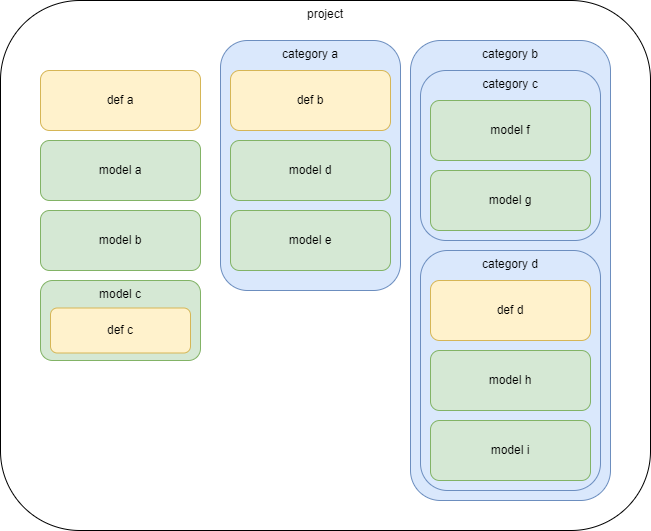
Projects and categories provide organization for multiple models. A project is a top-level group containing multiple models and/or categories, with each category containing multiple models or further categories. Project and category groups may also include additional groups and databases of data or resources which are not model specific, such as notebooks or definitions databases. In most cases with standard structures, models will default to databases or groups within the model, but search for them up the tree if not found. A complete project group might look like:

<div drawio-diagram="258"><img src="https://wiki.xina.io/uploads/images/drawio/2024-07/drawing-4-1722444744.png" alt=""/></div>

Note the definitions groups, which provide context for the data in models. A model is associated with the definitions defined by its closest ancestor. In this case, `"definitions a"` apply to models `a`, `b`, `f`, and `g`, `"definitions b"` to models `d` and `e`, `"definitions c"` to model `c`, and `"definitions d"` to models `h` and `i`.

**In practice it is strongly recommended to use a single definitions group as broadly as possible to facilitate comparing data. Tools are designed to efficiently compare data (even across models) with the same set of definitions.**

### Model Organization

Data within a model falls into four primary classifications:

- **Telemetry**
    - source data file(s) from data collection point
    - typically stored in a raw (sometimes binary) format
    - storage cost is cheap
    - accessing data means downloading files or most likely requires custom XINA tools
    - may be divided into multiple **pipes** (see below)
- **Viewable Data**
    - extracted from telemetry into XINA database(s)
    - telemetry is the single source of truth for this data, not intended to be user editable 
        - (except under controlled circumstances with struct API calls)
    - data is either **mnemonic**, **instant**, or **interval** (see below)
    - can be accessed and analyzed with built-in XINA tools
    - storage is expensive
    - optimizations may be needing depending on project requirements, data volumes
- **User Metadata**
    - additional data added by users, often directly through the XINA interface
    - XINA likely the primary repoository for this data
    - for example, a notebook
- **Definitions / References**
    - may be user entered or defined outside XINA
    - may exist at model level or above (category/project level)
    - more formal and restricted than user metadata

### Pipes

Abstractly, a **data pipe** (or simply **pipe**) is a single point of data import to a model. In many cases, a model will only have a single pipe; for example, if all data is provided directly from a single instrument, or multiple components are merged into a single data stream through FEDS before import into XINA.

However, in environments with multiple import points running in parallel, databases must be designed with multiple origins.

In this example each source file would need to specify either `origin_a` or `origin_b`. Additionally, each origin has distinct databases for instant, interval, and mnemonic data. This would be required if each data source provided all three data types. As requirements for instants and intervals are less stringent than mnemonics, in some circumstances instants and intervals could be considered a single source and populated independently:

# Data Lifecycle

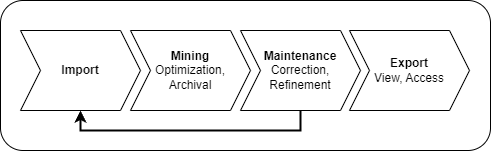
The XINA structs mnemonic data lifecycle involves four primary phases:

<div drawio-diagram="256"><img src="https://wiki.xina.io/uploads/images/drawio/2024-07/drawing-4-1722260670.png" alt=""/></div>

## Source Files

Each pipe maintains a set of **source files**, containing all data imported into XINA for that pipe.

The primary type of source files are **archive source files**. Archive files are considered the **definitive record of source data for a range of time for a single pipe**. These are stored in the XINA xbin binary file format. These are imported directly with the STRUCT ARCHIVE IMPORT action. Archive files are **mined** through the XINA Structs Mine task into XINA databases in order to be viewed in the XINA client, and are used to generate export packages.

Alternatively, an pipe may use **buffer source files**. Buffer files may be imported in a variety of data formats and are not subject to the same strict requirements as archive files. These may are imported directly with the STRUCT BUFFER IMPORT action. Mnemonic data from buffer files is loaded into a temporary buffer database for immediate viewing in the XINA client. Buffer files are **archived** (merged and converted into archive files) through the XINA Structs Archive task, which can be run manually or configured to run in regular intervals. *This is the recommended approach for importing mnemonic data when getting started with XINA Structs.*

## Data Flow

In general, there are three supported approaches for pipe data flow: **buffer** import, **variable time archive** import, and **fixed time archive** import. While a single pipe can only support one workflow, a model may combine multiple workflows using multiple pipe.

### Buffer Import

The buffer import workflow is the most flexible mnemonic import method. Buffer files do not need to adhere to strict requirements (aside from conforming to standard accepted file formats). Buffer files for a given pipe may have duplicated data, overlapping data, and can introduce new mnemonic definitions on demand.

Buffer files are imported with the STRUCT BUFFER IMPORT action. This invokes three effects:

- the raw buffer file is parsed, validated, and stored in the model pipe **[mnemonic buffer file database](struct-definitions-reference#bkmrk-mn-file-buffer)**
- new **mnemonic definitions** are created for any unrecognized mnemonic labels
- data is added to the **[mnemonic buffer database](struct-definitions-reference#bkmrk-mn-buffer)** for the associated pipe

No additional data processing occurs as part of this step. XINA models utilizing buffer source files must implement routine execution of the `STRUCT_BUFFER_ARCHIVE` asynchronous task (typically every hour) to merge the files into archive files in a fixed-time archive format, which can then be processed by `STRUCT_ARCHIVE_MINE` tasks to fully process data into model standard databases.

**Pros**

- minimal client side configuration required to get started
- allows smaller, faster file uploads to view data close to real-time
- flexible and responsive to changing environments, mnemonics, requirements

**Cons**

- performance is worse than client side aggregation
- not recommended above 1k total data points per second

#### Struct Archive Task

The XINA Struct Archive task merges and compresses buffer files into archive files. This step is required to resolve any data discrepancies and ensure data is preserved in accordance with the requirements of archive files. The task performs the following steps:

- load all unprocessed files from the buffer file database
- for each time ranges affected by unprocessed files 
    - process each file into processed format
    - load any existing processed files in those time ranges
    - merge data from all processed files for time range into single archive file
    - upload newly processed buffer files
    - delete unprocessed buffer files
    - upload merged archive file
    - run mining task on merged archive file
    - delete any mnemonic data already present for time range
    - import mnemonic data generated by mining task

### Direct Archive Import

Archive files are imported directly with the STRUCT ARCHIVE IMPORT action.

**Pros**

- much higher performance ceiling than server side aggregation
- stringent validation ensures data conforms to standard

**Cons**

- more complex initial setup
- mnemonic definitions must be pre-defined and cannot be added on-the-fly
- mnemonic definitions need coordination between client and server
- changes are more complex and likely involve human interaction

#### Fixed-Time Archive Import

With fixed-time archive import each archive has a fixed time range. This is a recommended solution for projects which generate a persistent data stream (for example, data sources piped through a FEDS server).

#### Variable-Time Archive Import

With variable-time archive import each archive specifies a custom time range. This is a recommended solution for projects which generate their own archival equivalent (for example, outputting a discrete data set after running a script). Because the time ranges are determined by the source data, it is recommended to generate interval events matching each file as a time range reference.

### Source File Formats

Currently there are two natively supported general purpose formats, one using the codes `csv`/`tsv` ([full documentation here](csv-tsv-format-reference)), and a binary format using the code `xbin` ([full documentation here](xbin-format-reference)) Additional formats will be added in the future, and custom project-specific formats may be added as needed.

### Assumptions and Limitations

Each archive source file is considered the **single source of truth for all mnemonics, instants, and intervals for it's associated pipe for its time range**. This has the following implications:

**Archive files with the same pipe cannot contain overlapping time ranges.** If an import operation is performed with a file violating this constraint the operation will fail and return an error.

**Within a single model, each mnemonic may only come from a single pipe.** Because mnemonics are not necessarily strictly associated with models, and the source may vary between models, this cannot be verified on import and must be verified on the client prior to importing data.

# Mnemonics

A **mnemonic** defines a single field of **numeric** data in a XINA model. A **datapoint** is a single record of a mnemonic, consisting of:

- time (Unix microseconds)
- mnemonic identifier
- value (numeric)

In other words, **the value of a single mnemonic at a moment in time**.

A model has one or more mnemonic databases, containing all of the datapoints associated with the model.

### Mnemonic Definitions

All mnemonics are defined in a **mnemonic definitions** database. It is **strongly recommended** to use a single definitions database for an entire project to faciliate comparison of data between models.

A core challenge of working with mnemonics is synchronizing mnemonic definitions from XINA to the point of data collection. Especially in early test environments, fields may be frequently added or removed on the the fly and labels may change, but must be consistently associated with a single mnemonic definition. Broadly there are two approaches to manage this challenge.

The first is user maintained mnemonic definitions. This is recommended for environments without frequent changes, and ideally one data source. The end user is responsible for ensuring that imported data has matching `mn_id` values to mnemonics present in the definitions database. This will typically result in faster imports and support complex or custom data pipeline solutions.

The second solution is allowing XINA to manage mnemonic definitions. With this approach, data can be imported with plain text labels and automatically associated with mnemonic definitions if available, or new definitions can be created on the fly.

Both approaches can be accomplished with the `model_mn_import` API action, [documented here](http://wiki.xina.io/books/api-reference/page/model-actions). The details of the required approach will depend on project requirements.

#### Fields

**Mnemonic ID**

Unique numeric ID, assigned by XINA.

**Name**

Mnemonic name. Conforms to [structs naming conventions](naming-conventions). Must be unique in combination with subname and unit.

**Subname**

Essentially a name suffix.

**Description**

Optional plain text mnemonic description.

**Unit**

Optional (but strongly recommended) measurement unit (for example, `V`, `mA`, etc).

**Standard Fields**

<table id="bkmrk-field-type-descripti"><thead><tr><th>field</th><th>type</th><th>description</th></tr></thead><tbody><tr><td>`state`</td><td>`model_mn_state`</td><td>current state of mnemonic (`active`, `inactive`, `archived`, `deprecated`)</td></tr><tr><td>`origins`</td><td>`jsonobject`</td><td>map of model(s) to associated origin(s)</td></tr><tr><td>`full`</td><td>`asciivstring(32)`</td><td>the primary database for the mnemonic, default `f8` (may be `null`)</td></tr><tr><td>`bin`</td><td>`set(asciivstring(32))`</td><td>the opt-in bin database(s) to include the mnemonic in</td></tr><tr><td>`format`</td><td>`asciivstring(32)`</td><td>printf-style format to render values</td></tr><tr><td>`enum`</td><td>`jsonobject`</td><td>mapping of permitted text values to numeric values</td></tr><tr><td>`labels`</td><td>`list(jsonobject)`</td><td>mapping of numeric values or ranges to labels</td></tr><tr><td>`aliases`</td><td>`set(asciivstring(128))`</td><td>set of additional names associated with the mnemonic</td></tr><tr><td>`meta`</td><td>`jsonobject`</td><td>additional metadata as needed</td></tr><tr><td>`query`</td><td>`asciivstring(32)`</td><td>query name for meta-mnemonics (may be `null`)</td></tr><tr><td>`conf`</td><td>`jsonobject`</td><td>configuration for meta-mnemonics (may be `null`)</td></tr></tbody></table>

Although the mnemonic name is intended to be unique, insertion of a mnemonic with the same name but different unit will create a new mnemonic definition. This is intended to avoid interruption of data flow, but should be corrected with the Mnemonic Management tool when possible. The `model` and `origin` are populated automatically for auto-generated mnemonic definitions.

The mnemonic `state` affects how the mnemonic will be displayed and populated. An `inactive` mnemonic indicates data is no longer relevant or actively populated and will be hidden by default. A `deprecated` mnemonic extends this concept but will throw errors if additional data points for the mnemonic are imported.

If `enum` is provided a mnemonic will apply labels to enumerated numeric values, as provided in `values`. For example, a 0|1 on|off state could be represented by `{"0":"OFF", "1":"ON"}`. Values in this map may also be used to parse imported data.

A mnemonic may specify one or more `aliases` to indicate additional names that should be included in the single mnemonic definition. If present, the aliases are referenced at a **higher priority** than the mnemonic name during import lookup. For example, a given mnemonic `a` is erroneously labeled `b` in some imported data, which creates a new separate mnemonic definition for `b`. To correct this, `b` could be added as an alias for `a`, and the `b` mnemonic could be deprecated. All `a` and `b` data from the source telemetry would then correctly be merged into the `a` mnemonic.

`name`, `unit`, `state`, `enum`, `models`, and `aliases` may be used during the data import process to validate and interpret data. Full details of how each field is used is documented with the associated API action.

### Mnemonic Databases

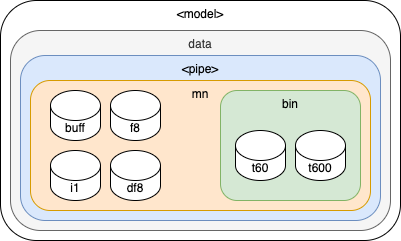
Within a model, each data source must have a set of one or more mnemonic databases. Each set should be contained by a group, which can be configured to define any relationships between the databases. This will typically include a **full** database, containing all or **delta** optimized data (see below for additional information), and one or more types of **bin** databases, depending on requirements.

<div drawio-diagram="254"><img src="https://wiki.xina.io/uploads/images/drawio/2024-07/drawing-4-1721143506.png" alt=""/></div>

While each data source must have its own mnemonic database(s), it may be beneficial for a single data source to further subdivide mnemonics into different types of databases for optimization purposes. For example, a model with a large number of mnemonics that only require single byte precision would see significant performance gains from separate databases using the `int(1)` type. In practice this could look like:

#### Full Database

In most cases, there will be a single primary database containing **full mnemonic** data (all points from original telemetry), **delta mnemonic** data (an optimization option, see below), or a mix of both. Data is stored with a single data point per row.

A value of `null` may be used for `v` to indicate a gap in data, otherwise data will appear visually connected by default in XINA charts. `null` may also be appropriate to represent `NaN` or `Inf` values, as these cannot be stored in the database, but the preference to include these as `null` or omit them altogether may depend on an individual mnemonic.

For large data sets with infrequent value changes, it may be beneficial to employ a **delta mnemonic** optimization. This requires the `n` field listed above. In this case, a point is only included in the database at the moment the value for a given mnemonic changes, and the number of points is stored in `n`. For example, given the set of points:

<table id="bkmrk-t-v-0-0-1-0-2-0-3-1-"><thead><tr><th>t</th><th>v</th></tr></thead><tbody><tr><td>0</td><td>0</td></tr><tr><td>1</td><td>0</td></tr><tr><td>2</td><td>0</td></tr><tr><td>3</td><td>1</td></tr><tr><td>4</td><td>1</td></tr><tr><td>5</td><td>1</td></tr><tr><td>6</td><td>1</td></tr><tr><td>7</td><td>2</td></tr><tr><td>8</td><td>2</td></tr><tr><td>9</td><td>2</td></tr></tbody></table>

Delta optimization would condense the data to:

<table id="bkmrk-t-v-n-0-0-2-2-0-1-3-"><thead><tr><th>t</th><th>v</th><th>n</th></tr></thead><tbody><tr><td>0</td><td>0</td><td>2</td></tr><tr><td>2</td><td>0</td><td>1</td></tr><tr><td>3</td><td>1</td><td>3</td></tr><tr><td>6</td><td>1</td><td>1</td></tr><tr><td>7</td><td>2</td><td>2</td></tr><tr><td>9</td><td>2</td><td>1</td></tr></tbody></table>

Note the final data point of a data set is always included.

#### Bin Database(s)

The most common data optimization employed with mnemonics is **binning**, combining multiple data points over a fixed time range into a single data point with a min, max, avg, and standard deviation. A model may define one or more bin databases depending on performance requirements, but four types are supported by default. The time range of bins is interpretted as `[start, end)`.

##### Time Binning

Bins are applied on a **fixed time interval** for all points in the database (for example, 1 minute or 1 hour).

**Standard Fields**

<table id="bkmrk-field-type-descripti-1"><thead><tr><th>field</th><th>type</th><th>description</th><th>required</th></tr></thead><tbody><tr><td>`t`</td><td>`instant` (matching model standard)</td><td>start time of the bin</td><td>yes</td></tr><tr><td>`t_min`</td><td>`instant` (matching model standard)</td><td>time of first data point in bin</td><td>yes</td></tr><tr><td>`t_max`</td><td>`instant` (matching model standard)</td><td>time of last data point in bin</td><td>yes</td></tr><tr><td>`mn_id`</td><td>`int(4)`</td><td>unique mnemonic ID</td><td>yes</td></tr><tr><td>`n`</td><td>`int(4)`</td><td>number of data points in bin</td><td>yes</td></tr><tr><td>`avg`</td><td>`float(8)`</td><td>average of points in bin</td><td>yes</td></tr><tr><td>`min`</td><td>`float(8)`</td><td>min of points in bin</td><td>yes</td></tr><tr><td>`max`</td><td>`float(8)`</td><td>max of points in bin</td><td>yes</td></tr><tr><td>`med`</td><td>`float(8)`</td><td>median of points in bin</td><td>no</td></tr><tr><td>`var`</td><td>`float(8)`</td><td>variance of points in bin</td><td>no</td></tr><tr><td>`std`</td><td>`float(8)`</td><td>standard deviation of points in bin</td><td>no</td></tr></tbody></table>

##### Interval Binning

Bins are based on explicitly defined **intervals**.

**Standard Fields**

<table id="bkmrk-field-type-descripti-2"><thead><tr><th>field</th><th>type</th><th>description</th><th>required</th></tr></thead><tbody><tr><td>`t_start`</td><td>`instant(us)`</td><td>start time of the bin</td><td>yes</td></tr><tr><td>`t_end`</td><td>`instant(us)`</td><td>end time of the bin</td><td>yes</td></tr><tr><td>`dur`</td><td>`duration(us)`</td><td>duration</td><td>yes</td></tr><tr><td>`t_min`</td><td>`instant(us)`</td><td>time of first data point in bin</td><td>yes</td></tr><tr><td>`t_max`</td><td>`instant(us)`</td><td>time of last data point in bin</td><td>yes</td></tr><tr><td>`u_id`</td><td>`UUID`</td><td>UUID of associated interval</td><td>yes</td></tr><tr><td>`p_id`</td><td>`int(8)`</td><td>primary ID of associated interval</td><td>yes</td></tr><tr><td>`s_id`</td><td>`int(4)`</td><td>secondary ID of associated interval</td><td>yes</td></tr><tr><td>`mn_id`</td><td>`int(4)`</td><td>unique mnemonic ID</td><td>yes</td></tr><tr><td>`n`</td><td>`int(4)`</td><td>number of data points in bin</td><td>yes</td></tr><tr><td>`avg`</td><td>`float(8)`</td><td>average of points in bin</td><td>yes</td></tr><tr><td>`min`</td><td>`float(8)`</td><td>min of points in bin</td><td>yes</td></tr><tr><td>`max`</td><td>`float(8)`</td><td>max of points in bin</td><td>yes</td></tr><tr><td>`med`</td><td>`float(8)`</td><td>median of points in bin</td><td>no</td></tr><tr><td>`var`</td><td>`float(8)`</td><td>variance of points in bin</td><td>no</td></tr><tr><td>`std`</td><td>`float(8)`</td><td>standard deviation of points in bin</td><td>no</td></tr></tbody></table>

# Events

**Events** are the primary means of organizing structs data. They have two forms: **instants**, referring to a **single moment in time**, and **intervals**, referring to a **range of time**. The goal of events is to make it easy to find, compare, and trend data.

### Fields

Unlike most structs databases, event databases may include as many custom fields as required, so long as they do not conflict with the required standard fields:

**UEID**

Universally unique event identifier (UUID). Intended to permanently, globally specify each event. Should be generated at the creation of the event to ensure consistency even if data is reprocessed.

**Event ID**

Optional numeric reference to an [event definition](https://wiki.xina.io/link/170#bkmrk-event-definitions) (also see below). If not provided, defaults to `0`.

**Type**

Indicates how the event should be viewed and interpreted. The options are defined by XINA.

**Level**

Indicates how the event should be viewed and interpreted. The options are defined by XINA.

**Label**

Required plain text description of the event. Limited to to 128 bytes for indexing.

**Content**

Optional plain text, HTML, or JSON of unlimited length.

**Meta**

Optional JSON object of arbitrary additional content.

### Types

XINA defines a fixed set of standard event types, each with an associated numeric code. The type is stored as the code in the database for performance reasons; for practical purposes most actions can use the type name directly, unless interacting directly with the API.

**Standard Types**

<table id="bkmrk-code-name-ins-int-de"><thead><tr><th>Code</th><th>Name</th><th>Ins</th><th>Int</th><th>Description</th></tr></thead><tbody><tr><td>`0`</td><td>`message`</td><td>✓</td><td>✓</td><td>Basic event, ID optional</td></tr><tr><td>`1`</td><td>`marker`</td><td>✓</td><td>✓</td><td>Organized event, ID required</td></tr><tr><td>`2`</td><td>`alert`</td><td>✓</td><td>✓</td><td>Organized event, ID required, level (severity) required</td></tr><tr><td>`2000`</td><td>`test`</td><td></td><td>✓</td><td>Discrete test period, may not overlap other tests, ID optional</td></tr><tr><td>`2001`</td><td>`activity`</td><td></td><td>✓</td><td>Discrete activity period, may not overlap other activities, ID optional</td></tr><tr><td>`2002`</td><td>`phase`</td><td></td><td>✓</td><td>Discrete phase period, may not overlap other phases, ID optional</td></tr><tr><td>`2010`</td><td>`filter`</td><td></td><td>✓</td><td>Filter state</td></tr><tr><td>`3000`</td><td>`data`</td><td>✓</td><td>✓</td><td>General purpose data set</td></tr><tr><td>`3001`</td><td>`spectrum`</td><td>✓</td><td>✓</td><td>General purpose spectrum data</td></tr></tbody></table>

Additional types will be added in the future as needed, with codes based on this chart:

**Standard Type Code Ranges**

<table id="bkmrk-code-ins-int-descrip"><thead><tr><th>code</th><th>ins</th><th>int</th><th>description</th></tr></thead><tbody><tr><td>`0-999`</td><td>✓</td><td>✓</td><td>General types for instants and intervals</td></tr><tr><td>`1000-1999`</td><td>✓</td><td></td><td>General types for instants only</td></tr><tr><td>`2000-2999`</td><td></td><td>✓</td><td>General types for intervals only</td></tr><tr><td>`3000-3999`</td><td>✓</td><td>✓</td><td>Data set types for instants and intervals</td></tr><tr><td>`4000-4999`</td><td>✓</td><td></td><td>Data set types for instants only</td></tr><tr><td>`5000-5999`</td><td></td><td>✓</td><td>Data set types for intervals only</td></tr></tbody></table>

### Definitions

As with mnemonics, events may be identified with [event definitions](https://wiki.xina.io/link/170#bkmrk-event-definitions). However, unlike mnemonics, not every event requires a definition. The event ID field associates an event with an event definition. Each event ID is associated with a unique name, describing the definition. These work similarly to mnemonic names for purposes for definition creation. If an event is inserted with an unrecognized name, a new definition will be created for that name and assigned a new event ID.

### Context

An event database may either be a child of a model or pipe group. A model event database is essentially like any other XINA database, but with support for the [STRUCT EVENT](https://wiki.xina.io/link/72#bkmrk-struct-event) API actions.

Pipe event databases are more restrictive. The events must be embedded in the data set of the pipe, and cannot be inserted manually. Each event is associated with the archive in which it starts. Events may cross archive boundaries by initially being inserted as `open` events (having a start time but no end time) and later using the `$event.close` operation to assign an end time. Additionally, pipe event databases have an associated event change database to track manually applied updates outside of the source data set. This allows changes to be preserved if data is remined from the archive files. The intention is that these accurately reflect the archived data, so fields must opt-in to being editable by this operation.

### Data Formats

The `data` event type indicates a basic data set. This is typically used with the single file per event database structure, in which case the file will contain the data set. For event databases without files, the data is expected to be stored in the `content` field. This is only recommended for small datasets (less than 1MB).

Files must be either ASCII or UTF-8 encoded. New lines will be interpretted from either `\n` or `\r\n`. The `conf` object may define other customization of the format:

**Conf Definition**

<table id="bkmrk-key-value-default-de"><thead><tr><th>Key</th><th>Value</th><th>Default</th><th>Description</th></tr></thead><tbody><tr><td>`delimiter`</td><td>`string`</td><td>auto detect (`','`, `'\t'`, `';'`)</td><td>value delimiter</td></tr><tr><td>`quoteChar`</td><td>`character`</td><td>`"` (double quote character)</td><td>value quote character</td></tr><tr><td>`ignoreLines`</td><td>`number`</td><td>`0`</td><td>number of lines to skip before the header</td></tr><tr><td>`invalid`</td><td>`null`, `'NaN'`, `number`</td><td>`null`</td><td>preferred interpretation of invalid literal</td></tr><tr><td>`nan`</td><td>`null`, `'NaN'`, `number`</td><td>`null`</td><td>preferred interpretation of `'Nan'` literal</td></tr><tr><td>`pInfinity`</td><td>`null`, `'Inf'`, `number`</td><td>`null`</td><td>preferred interpretation of positive `'Infinity'` literal</td></tr><tr><td>`nInfinity`</td><td>`null`, `'Inf'`, `number`</td><td>`null`</td><td>preferred interpretation of negative `'Infinity'` literal</td></tr><tr><td>`utc`</td><td>`boolean`</td><td>`false`</td><td>if `true`, interpret all unzoned timestamps as UTC</td></tr></tbody></table>

Starting after the number provided for `ignoreLines`, the content must include a header for each column, with a name and optional unit in parentheses. Special standard unit names may be used to indicate time types, which will apply different processing to the column:

<table id="bkmrk-unit-description-ts-"><thead><tr><th>Unit</th><th>Description</th></tr></thead><tbody><tr><td>`ts`</td><td>text timestamp, interpretted in local browser timezone (absent explicit zone)</td></tr><tr><td>`ts_utc`</td><td>text timestamp, interpretted as UTC timezone (absent explicit zone)</td></tr><tr><td>`unix_s`</td><td>Unix time in seconds</td></tr><tr><td>`unix_ms`</td><td>Unix time in milliseconds</td></tr><tr><td>`unix_us`</td><td>Unix time in microseconds</td></tr></tbody></table>

# Structs Data Format

Structs data files can contain mnemonic and/or event data. They have two basic forms, **archive** files, which must use the [XBin format](xbin-format), and **buffer** files, which may either use the [structs DSV format](structs-dsv-format) or the XBin format. In either format, they essentially provide a set of time-key-value mappings. By default keys are interpretted as mnemonics, unless they start with the dollar sign (`$`) character, in which case they are interpretted according to the rules of this document. Currently this is only used to embed event data, but additional features may be added in the future.

Note that buffer files are only intended to be imported with the [STRUCT BUFFER IMPORT](https://wiki.xina.io/books/api-reference/page/struct-actions#bkmrk-struct-buffer-import) API action.

### Mnemonics

Mnemonic data may either be denoted by the numeric [mnemonic ID](https://wiki.xina.io/link/170#bkmrk-name-type-req-descri-3), or text [mnemonic name](https://wiki.xina.io/link/170#bkmrk-name-type-req-descri-3). The value will be interpretted as a mnemonic ID if it is a [numeric XBin type](https://wiki.xina.io/link/80#bkmrk-value-format), or if it is a string containing only digit characters. If the ID is used, it must already be associated with an existing [mnemonic definition](https://wiki.xina.io/link/170#bkmrk-mnemonic-definitions), or an error will be thrown. Otherwise the text will be parsed as follows:

```
mnemonic   = name [ ';' subname ] [ ( '::' unit-enums ) | ( '(' unit-enums ')' ) ] [ '#' description ]
unit-enums = unit [ ';' enums ]
enums      = enum | ( enums [ '|' enum ] )
enum       = [ integer '=' ] label

```

The parsed mnemonic has five elements: the **name**, **subname**, **unit**, **enum map**, and **description**. Only the name is required. The combination of name, subname, and unit are used to lookup an existing mnemonic. The comparison is case insensitive and any whitespace is treated as a single underscore. If a matching mnemonic is not found, a new mnemonic is created automatically. Note that the overall name cannot contain the colon (`:`), semicolon (`;`), dollar sign (`$`), or number sign (`#`) characters.

The enum map specifies a one-to-one map of integer values to text labels. This is optional and unlike the other parameters, not interpretted as a key component of the mnemonic. They will be included in the generated mnemonic definition if it doesn't exist.

### Events

Event operations may also be embedded in structs data files. These are indicated by keys which start with `$event`. The supported operations are inserting instant events, opening interval events, and closing interval events. Events may specify a textual `"name"` instead of `"e_id"`, which can be used to lookup a corresponding event definition ID, or create a new event definition if one does not exist with the provided name. From a user's perspective, a `name` can be easier to remember and more descriptive than a numeric `e_id`. The event's `a_id_start` (Start Archive ID) and `a_id_end` (End Archive ID) will be automatically populated with the Archive ID of the file being processed.

For the purposes of the following examples, assume a model "m" contains a pipe "p" with 3 event databases, "e", "ef" (single file per event), and "efs" (multi-file per event).

See also the [Events](https://wiki.xina.io/books/structured-data-standards/page/struct-definitions-reference#bkmrk-events) and [Event Definitions](https://wiki.xina.io/link/170#bkmrk-event-definitions) references for the supported fields.

#### Insert Event Operation

```
$event.insert.<database name>

```

Creates a single [event](https://wiki.xina.io/books/structured-data-standards/page/events) which may be an instant or a completed interval. The database name must correspond to an event database in the associated pipe. The value must be a JSON object in the standard [record format](https://wiki.xina.io/books/api-reference/page/record-syntax), with fields appropriate to the specified [Events database](https://wiki.xina.io/link/170#bkmrk-events). The event must omit both the `"t_start"` and `"t_end"` values which will be populated by the time value from the corresponding row in the buffer file. The `a_id_start` and `a_id_end` will be populated from the file's `a_id`.

#### Open Interval Event Operation

```
$event.open.<database name>

```

Creates a single open event (interval with a start time and no end time). Uses the key `$event.open.<database name>`. The value must be a single JSON object, defining the content of the event record. The event must omit both the `"t_start"` and `"t_end"` values (`"t_start"` is populated by the row time, and `"t_end"` is `null` for an open interval). The `a_id_start` will be populated from the file's `a_id`.

#### Close Interval Event Operation

```
$event.close.<database name>

```

Closes an existing open event. The value must be a single JSON object, which may be used to update the values of any fields of the event. The object must omit both the `"t_start"` and `"t_end"` values (`"t_start"` cannot be edited, and `"t_end"` is populated by the row time). The `a_id_end` will be populated from the file's `a_id`.

# Structs DSV Format

The XINA Structs DSV (delimiter separated values) format provides a standard delimited text data file format. This is recommended for data files attached to events, and forms the basis for the [structs buffer file format](structs-buffer-format).

Files have certain standard requirements:

- Must be UTF-8 encoded
- New lines will be interpretted from either `\n` or `\r\n`
- Blank lines will be ignored
- Lines starting with the `#` character are treated as comments and ignored

The `conf` object may define other customization of the format:

<table id="bkmrk-key-value-default-de"><thead><tr><th>Key</th><th>Value</th><th>Default</th><th>Description</th></tr></thead><tbody><tr><td>delimiter</td><td>string</td><td>`','` (comma character)</td><td>value delimiter</td></tr><tr><td>quote\_char</td><td>character</td><td>`"` (double quote character)</td><td>value quote character</td></tr><tr><td>ignore\_lines</td><td>number</td><td>`0`</td><td>lines to ignore at the start of the file</td></tr><tr><td>zone</td><td>string</td><td>UTC</td><td>time zone to use if not provided</td></tr><tr><td>values</td><td>JSON object</td><td></td><td>preferred interpretation of string literals (see below)</td></tr></tbody></table>

It is strongly recommended to include a unique [appropriately generated 128-bit UUID in the standard 36 character format](https://en.wikipedia.org/wiki/Universally_unique_identifier) as a comment in the first processed line of each file. (If `ignore_lines > 0`, this would be the first line after that number of lines.)

There are two format modes for DSV files: the **row** format, in which each line contains a time, label, and value, and the **column** format, in which each row contains a time and one or more values. The first processed uncommented line will be intepretted as the column header, which is used to determine the file format. The file will be treated as row mode if it contains exactly three columns, with each having one of the reserved column names in the table below.

<table id="bkmrk-name-description-alt"><thead><tr><th>Name</th><th>Description</th><th>Alternate Names</th></tr></thead><tbody><tr><td>**t**</td><td>Unix time or ISO8601 zoned timestamp</td><td>ts, time, timestamp, datetime, unix\_time, unix, utc</td></tr><tr><td>**k**</td><td>key</td><td>key, m, m\_id, mn, mn\_id, mnemonic, mnemonic\_id, n, name</td></tr><tr><td>**v**</td><td>value (numeric, empty, or `null`)</td><td>val, value</td></tr></tbody></table>

The header is used to determine the order of the columns.

For example (whitespace added for clarity, not required):

```text
# 123e4567-e89b-12d3-a456-426614174000
t , k     , v
0 , v_mon , 1
0 , i_mon , 5
1 , t_mon , 100
2 , v_mon , 1.1
2 , i_mon , 4
3 , t_mon , null
4 , v_mon , 1.2
4 , i_mon , 3
5 , t_mon , 101

```

Otherwise, the file will be interpretted as the column format, where the first must be the time column, followed by a column for each mnemonic. The column headers must specify the mnemonic name or ID for each column.

For example, the following is equivalent to the above example (whitespace added for clarity, not required):

```text
# 123e4567-e89b-12d3-a456-426614174000
t , v_mon , i_mon , t_mon
0 , 1     , 5     ,
1 ,       ,       , 100
2 , 1.1   , 4     ,
3 ,       ,       , null
4 , 1.2   , 3     ,
5 ,       ,       , 101

```

### Time Parsing

The mode of time processing is determined by the value for `t` in `conf`. The `auto` mode attempts to interpret the most likely formatting for the timestamp. If the value is an integer or floating point format, it will be interpretted as a Unix timestamp, with precision based on these rules:

- t &gt; `1e16`: error, value above typical range
- t &gt; `1e14`: microseconds
- t &gt; `1e11`: milliseconds
- t &gt; `1e8`: seconds
- t &lt;= `1e8`: error, value below typical range

Otherwise it will be interpretted as a zoned ISO8601 timestamp. If `t` is set explicitly in the configuration the time will always be interpretted in that context. The ISO timestamp may use the standard format:

`2023-05-31T17:55:07.000`

Or condensed format:

`20230531T175507.000`

If the `zone` property provided in the configuration, the timestamps do not require a zone. Otherwise they must include an explicit zone.

### Non-Numeric Values

Values which are non-numeric may be ignored, treated as `null`, or mapped to explicit values using the `values` property of the `conf` object. Ignored values are treated by XINA as though they do not exist in the file. `null` values are stored as an actual data point in the XINA database, but with the value `null` instead of a numeric value. (This is primarily useful to create a visual gap in plots.)

The following values are **ignored** by default (note, case-insensitive and whitespace agnostic):

- `""` (empty string)
- `"nv"` (no value, ITOS)
- `"na"`
- `"n/a"`

The following values are interpretted as `null` by default (note, case-insensitive and whitespace agnostic):

- `"null"`
- `"nil"`
- `"none"`
- `"nan"`
- `"inf"`
- `"+inf"`
- `"-inf"`
- `"infinity"`
- `"+infinity"`
- `"-infinity"`

Custom value interpretations may be specified in the values object as either `"ignore"`, `null`, or a numeric value. For example:

```json
{
 "?": "ignore",
 "notta": null,
 "onetwothree": 123
}

```

Any text value which does not include a custom or default mapping will cause an error. The defaults may be extended in the future.

# Structs Ids List Format

> WORK IN PROGRESS

The Struct Ids List format is a comma delimited string format for storing references to mnemonics. It is used in various Definitions such as the [Profile Definition](https://wiki.xina.io/link/170#bkmrk-profile-definitions) to store which mnemonics should be included in the Export Package.

The string format should be parsed as:

- Comma delimited, whitespace ignored
- For each item in list: 
    - unroll each instance of `#[]`
    - instance can only contain numeric values or numeric ranges
    - characters before `#` and after `]` should be prefixed and appended to each unrolled item, respectively
- For each unrolled item: 
    - if starts with @, treat as `ext_id`
    - if starts with a digit 
        - if contains `-`, treat as a numeric range
        - else, treat as single `mn_id`
    - otherwise treat as `name[;subname]` (aka mn key)

A numeric range is shorthand syntax for a range of numbers. For example `3-6` should be expanded to `3,4,5,6`.

##### Example:

```
@#[1,2,3]sci,name;subname,@100sci,@#[1,5-6,13,15-17]raw,15,20-22,#[40,50-52],30,name2

```

Will be parsed into:

`mn_ids`: \[ 15, 20, 21, 22, 40, 50, 51, 52, 30 \]

`ext_ids`: \[ "1sci", "2sci", "3sci", "100sci", "1raw", "5raw", "6raw", "13raw", "15raw", "16raw", "17raw" \]

`mn keys`: \[ "name;subname", "name2" \]

# XBin Format

The XBin (XINA Binary) format provides a XINA standard binary format for time based data files. It uses the file extension `xbin`.

The xbin format organizes **key-value** data by **time**. The data content is a series of **rows** in ascending time order, with each row having a single microsecond precision Unix time, unique within the file.

### Segment Format

XBin data is often encoded in **segments**, which are defined by an initial 1, 2, or 4 byte unsigned integer length, then that number of bytes. These are referred to in this document as:

- **seg1** (up to 255 bytes)
- **seg2** (up to 65,535 bytes)
- **seg4** (up to 2,147,483,647 bytes)

If the length value of a segment is zero there is no following data and the value is considered **empty**.

#### Examples

The string `"foo"` has a 3 byte UTF-8 encoding: `0x66`, `0x6f`, `0x6f`.

As a seg1, this is encoded with a total of 4 bytes (the initial byte containing the length, 3):

`0x03` `0x66` `0x6f` `0x6f`

As a seg2, 5 bytes:

`0x00` `0x03` `0x66` `0x6f` `0x6f`

And as a seg4, 7 bytes:

`0x00` `0x00` `0x00` `0x03` `0x66` `0x6f` `0x6f`

### Value Format

Each value starts with a 1 byte unsigned integer indicating the value type, followed by additional byte(s) containing the value itself, as applicable.

**Value Type Definition**

<table id="bkmrk-code-value-length-%28b"><thead><tr><th>Code</th><th>Value</th><th>Length (bytes)</th><th>Description</th></tr></thead><tbody><tr><td>`0`</td><td>`null`</td><td>0</td><td>literal `null` / empty string</td></tr><tr><td>`1`</td><td>ref dict index</td><td>1</td><td>index 0 to 255 (see below)</td></tr><tr><td>`2`</td><td>ref dict index</td><td>2</td><td>index 256 to 65,535</td></tr><tr><td>`3`</td><td>ref dict index</td><td>4</td><td>index 65,536 to 2,147,483,647</td></tr><tr><td>`4`</td><td>`true`</td><td>0</td><td>boolean literal</td></tr><tr><td>`5`</td><td>`false`</td><td>0</td><td>boolean literal</td></tr><tr><td>`6`</td><td>int1</td><td>1</td><td>1 byte signed integer</td></tr><tr><td>`7`</td><td>int2</td><td>2</td><td>2 byte signed integer</td></tr><tr><td>`8`</td><td>int4</td><td>4</td><td>4 byte signed integer</td></tr><tr><td>`9`</td><td>int8</td><td>8</td><td>8 byte signed integer</td></tr><tr><td>`10`</td><td>float4</td><td>4</td><td>4 byte floating point</td></tr><tr><td>`11`</td><td>float8</td><td>8</td><td>8 byte floating point</td></tr><tr><td>`12`</td><td>string1</td><td>variable</td><td>seg1 UTF-8 encoded string</td></tr><tr><td>`13`</td><td>string2</td><td>variable</td><td>seg2 UTF-8 encoded string</td></tr><tr><td>`14`</td><td>string4</td><td>variable</td><td>seg4 UTF-8 encoded string</td></tr><tr><td>`15`</td><td>json1</td><td>variable</td><td>seg1 UTF-8 encoded JSON</td></tr><tr><td>`16`</td><td>json2</td><td>variable</td><td>seg2 UTF-8 encoded JSON</td></tr><tr><td>`17`</td><td>json4</td><td>variable</td><td>seg4 UTF-8 encoded JSON</td></tr><tr><td>`18`</td><td>jsonarray1</td><td>variable</td><td>seg1 UTF-8 encoded JSON array</td></tr><tr><td>`19`</td><td>jsonarray2</td><td>variable</td><td>seg2 UTF-8 encoded JSON array</td></tr><tr><td>`20`</td><td>jsonarray4</td><td>variable</td><td>seg4 UTF-8 encoded JSON array</td></tr><tr><td>`21`</td><td>jsonobject1</td><td>variable</td><td>seg1 UTF-8 encoded JSON object</td></tr><tr><td>`22`</td><td>jsonobject2</td><td>variable</td><td>seg2 UTF-8 encoded JSON object</td></tr><tr><td>`23`</td><td>jsonobject4</td><td>variable</td><td>seg4 UTF-8 encoded JSON object</td></tr><tr><td>`24`</td><td>bytes1</td><td>variable</td><td>seg1 raw byte array</td></tr><tr><td>`25`</td><td>bytes2</td><td>variable</td><td>seg2 raw byte array</td></tr><tr><td>`26`</td><td>bytes4</td><td>variable</td><td>seg4 raw byte array</td></tr><tr><td>`27`</td><td>xstring1</td><td>variable</td><td>seg1 xstring</td></tr><tr><td>`28`</td><td>xstring2</td><td>variable</td><td>seg2 xstring</td></tr><tr><td>`29`</td><td>xstring4</td><td>variable</td><td>seg4 xstring</td></tr><tr><td>`30`</td><td>xjsonarray1</td><td>variable</td><td>seg1 xjson array</td></tr><tr><td>`31`</td><td>xjsonarray2</td><td>variable</td><td>seg2 xjson array</td></tr><tr><td>`32`</td><td>xjsonarray4</td><td>variable</td><td>seg4 xjson array</td></tr><tr><td>`33`</td><td>xjsonobject1</td><td>variable</td><td>seg1 xjson object</td></tr><tr><td>`34`</td><td>xjsonobject2</td><td>variable</td><td>seg2 xjson object</td></tr><tr><td>`35`</td><td>xjsonobject4</td><td>variable</td><td>seg4 xjson object</td></tr><tr><td>`36` - `255`</td><td>unusued, reserved</td><td></td><td></td></tr></tbody></table>

#### XString Format

The **xstring** value type allows chaining mutliple encoded values to be interpretted as a string. The xstring segment length must be the total number of bytes of all encoded values in the string.

Note that although any data type may be included in an xstring, the exact string representation of certain values may vary depending on the decoding environment (specifically, the formatting of floating point values) and thus it is not recommended to include them in xstring values. JSON values will be converted to their minimal string representation. Byte arrays will be converted to a hex string. Null values will be treated as an empty string.

#### XJSON Array Format

The **xjsonarray** value type allows chaining mutliple encoded values to be interpretted as a JSON array. The xjsonarray segment length must be the total number of bytes of all encoded values in the array.

#### XJSON Object Format

The **xjsonobject** value type allows chaining mutliple encoded values to be interpretted as a JSON object. Each pair of values in the list is interpretted as a key-value pair. The xjsonobject segment length must be the total number of bytes of all encoded key-value pairs in the object. Note that key values must resolve to a string, xstring, number, boolean, or null (which will be interpretted as an empty string key).

#### Examples

**Null Value**:

<table id="bkmrk-code-content-%280-byte"><thead><tr><th>Code</th><th>Content (0 bytes)</th></tr></thead><tbody><tr><td>`0x00`</td><td></td></tr></tbody></table>

**300** (as 2 byte integer):

<table id="bkmrk-code-content-%282-byte"><thead><tr><th>Code</th><th>Content (2 bytes)</th></tr></thead><tbody><tr><td>`0x07`</td><td>`0x01` `0x2c`</td></tr></tbody></table>

**0.24** (as 8 byte float):

<table id="bkmrk-code-content-%288-byte"><thead><tr><th>Code</th><th>Content (8 bytes)</th></tr></thead><tbody><tr><td>`0x0b`</td><td>`0x3f` `0xce` `0xb8` `0x51` `0xEB` `0x85` `0x1E` `0xb8`</td></tr></tbody></table>

**"foo"** (as string1):

<table id="bkmrk-code-content-%284-byte"><thead><tr><th>Code</th><th>Content (4 bytes)</th></tr></thead><tbody><tr><td>`0x0c`</td><td>`0x03` `0x66` `0x6f` `0x6f`</td></tr></tbody></table>

**{"foo":"bar"}** (as json1):

<table id="bkmrk-code-content-%2814-byt"><thead><tr><th>Code</th><th>Content (14 bytes)</th></tr></thead><tbody><tr><td>`0x0f`</td><td>`0x0d` `0x7b` `0x22` `0x66` `0x6f` `0x6f` `0x22` `0x3a` `0x22` `0x62` `0x61` `0x72` `0x22` `0x7d`</td></tr></tbody></table>

**"foo123"** (as xstring1, split as string1 "foo" and int1 123):

<table id="bkmrk-code-content-%287-byte"><thead><tr><th>Code</th><th>Content (7 bytes)</th></tr></thead><tbody><tr><td>`0x1b`</td><td>\[ `0x06` \](total length) \[ `0x03` `0x66` `0x6f` `0x6f` \]("foo") \[ `0x04` `0x7b` \](123)</td></tr></tbody></table>

### Reference Dictionary

The xbin format provides user-managed compression through the reference dictionary. It can contain up to the 4 byte signed integer index space (2,147,483,647). The order of values affects the compression ratio; index 0-255 can be represented with a single byte, 256-65,535 with 2 bytes, and above requires 4 bytes.

### Binary File Format

#### UUID

The file starts with a 16 byte binary encoded UUID. This is intended to uniquely identify the file, but the exact implementation and usage beyond this is not explicitly defined as part of the format definition. For XINA purposes two xbin files with the same UUID would be expected to be identical.

#### Header

A value which must either be `null` or a `jsonobject1`, `jsonobject2`, or `jsonobject4`. This is currently a placeholder with no defined parameters.

#### Reference Dict

A seg4 containing 0 to 2,147,483,647 encoded values, which may be referenced by zero based index with the reference dict index value types.

#### Rows

Each row contains:

- 8 byte signed integer containing Unix time with microsecond precision
- seg4 of row data, containing 
    - header, single value which must either be `null` or a `jsonobject1`, `jsonobject2`, or `jsonobject4`
    - one or more key,value pairs

The row header is currently a placeholder with no defined parameters.

### Example File

Given a data set with UUID 9462ef87-f232-4694-922c-12b93c95e27c:

<table id="bkmrk-t-voltage-current-la"><thead><tr><th>t</th><th>voltage</th><th>current</th><th>label</th></tr></thead><tbody><tr><td>0</td><td>5</td><td>10</td><td>"foo"</td></tr><tr><td>1</td><td></td><td></td><td>"bar"</td></tr><tr><td>2</td><td>5</td><td>null</td><td></td></tr></tbody></table>

A corresponding xbin file containing the same data would be:

**UUID** (16 bytes)

`0x94` `0x62` `0xef` `0x87` `0xf2` `0x32` `0x46` `0x94` `0x92` `0x2c` `0x12` `0xb9` `0x3c` `0x95` `0xe2` `0x7c`

**Header** (1 byte)

`0x00` (null, 1 byte)

**Reference Dict**, three values, "voltage", "current", "label" (29 bytes)

`0x00` `0x00` `0x00` `0x19` (seg4 length, 25)

`0x0a` `0x07` `0x76` `0x6f` `0x6c` `0x74` `0x61` `0x67` `0x65` ("voltage", 9 bytes)

`0x0a` `0x07` `0x63` `0x75` `0x72` `0x72` `0x65` `0x6e` `0x74` ("current", 9 bytes)

`0x0a` `0x05` `0x6c` `0x61` `0x62` `0x65` `0x6c` ("label", 7 bytes)

**Row t0** (22 bytes)

`0x00` `0x00` `0x00` `0x00` `0x00` `0x00` `0x00` `0x00` (time, 0, 8 bytes)

`0x00` `0x00` `0x00` `0x0e` (row length, 15, 4 bytes)

`0x00` (header, null, 1 byte)

`0x01` `0x00` (reference to index 0, "voltage", 2 bytes)

`0xff` (type code reference to index 0, 5, 1 byte)

`0x01` `0x01` (reference to index 1, "current", 2 bytes)

`0x04` `0x0a` (integer value 10, 2 bytes)

`0x01` `0x02` (reference to index 2, "label", 2 bytes)

`0x0a` `0x03` `0x66` `0x6f` `0x6f` (string "foo", 5 bytes)

**Row t1** (20 bytes)

`0x00` `0x00` `0x00` `0x00` `0x00` `0x00` `0x00` `0x01` (time, 1, 8 bytes)

`0x00` `0x00` `0x00` `0x08` (row length, 8, 4 bytes)

`0x00` (header, null, 1 byte)

`0x01` `0x02` (reference to index 2, "label", 2 bytes)

`0x0a` `0x03` `0x62` `0x61` `0x72` (string "bar", 5 bytes)

**Row t2** (19 bytes)

`0x00` `0x00` `0x00` `0x00` `0x00` `0x00` `0x00` `0x02` (time, 2, 8 bytes)

`0x00` `0x00` `0x00` `0x0e` (row length, 15, 4 bytes)

`0x00` (header, null, 1 byte)

`0x01` `0x00` (reference to index 0, "voltage", 2 bytes)

`0x00` (type code reference to index 0, 5, 1 byte)

`0x01` `0x01` (reference to index 1, "current", 2 bytes)

`0x00` (null, 1 byte)

# Struct Extract Interface

> Warning: This page is a Work In Progress

For projects that use packet file archives, XINA Mining ([struct\_mining](https://wiki.xina.io/books/utilities/page/xina-struct-mine)) and Export ([struct\_export](https://wiki.xina.io/books/utilities/page/xina-struct-export)) delegates the decoding and conversion of mnemonic data to a mission specific tool, which we will reference as `struct_extract`. This tool should implement the following interface for integration with XINA.

##### Environment

- The app should be runnable on Ubuntu 22.04.
- Any required environment setup will be performed on a per project basis.

##### Input

`struct_extract` should accept a single argument which is the path to a JSON file. The JSON file defines the parameters needed to extract the requested mnemonic data. Project specific keys can be added as needed. The following table defines the standard parameters:

> Note: If `raw`, `eng`, or `sci` are not provided, all mnemonics should be extracted as "science".

<table id="bkmrk-key-required-descrip"><thead><tr><th>Key</th><th>Required</th><th>Description</th></tr></thead><tbody><tr><td>dir</td><td>✓</td><td>The path to the dir containing the archive file and any ancillary files needed for processing</td></tr><tr><td>dest</td><td>✓</td><td>The path to the dir that all output (e.g. `xbin` file) should be placed</td></tr><tr><td>mission</td><td>✓</td><td>TBC: The mission which may be needed to determine how the archive file is processed</td></tr><tr><td>model</td><td>✓</td><td>TBC: The mission's model which may be needed to determine how the archive file is processed</td></tr><tr><td>raw</td><td></td><td>The mnemonic IDs of the mnemonics that should be extracted and output, unconverted</td></tr><tr><td>eng</td><td></td><td>The mnemonic IDs of the mnemonics that should be extracted and output with the engineering conversion applied</td></tr><tr><td>sci</td><td></td><td>The mnemonic IDs of the mnemonics that should be extracted and output with the science conversion applied</td></tr><tr><td>time\_mode</td><td></td><td>For projects that support it, defines which time source should be used when timestamping the mnemonic data. Either "pkt" or "grt" (ground receipt time). If not provided, it should default to packet time.</td></tr></tbody></table>

Example JSON configuration file:

```json
{
}

```

##### Output

The output of the tool should be a [xbin file](https://wiki.xina.io/books/structured-data-standards/page/xbin-format). XINA's tools will then process the `xbin` file to produce the required mine or export products.

For mission specific data, `struct_extract` should output using one of the following options \[TBD\]:

- Self generate the data file and corresponding XINA JSON import file. XINA will take care of importing the data.
- Output the data into the xbin file. XINA will take care of the rest.

##### Return Codes

Return codes are used by the `struct_extract` app to return final execution status to the XINA processing.

<table id="bkmrk-name-code-descriptio"><thead><tr><th>Name</th><th>Code</th><th>Description</th></tr></thead><tbody><tr><td>Success</td><td>0</td><td>Execution was successful</td></tr><tr><td>Error</td><td>1</td><td>Generic error code for unsuccessful execution. A more specific error code should be preferred over this one.</td></tr><tr><td>Finished with warnings</td><td>3</td><td>Execution finished but there were warnings. The log file should be examined for more info</td></tr></tbody></table>

# Struct Definitions Reference

This page provides a reference for the purpose and structure of all structs standard groups and databases.

Structs groups and databases are marked with a JSON object using the key `xs_struct`. This contains three standard parameters:

- `"type"` - the name of the type of struct element as a string
- `"v"` - the current version this instance of the specified type as a string
- `"conf"` - optional JSON object, format depends on type

Versioning is tied to the version number of the XINA server. Typically server updates will automatically apply needed changes to all structs schema elements, incrementing their `"v"` property to the latest version. In the event an upgrade cannot be performed the version will not be changed.

## Groups

Note that group versioning is used to manage databases required within groups.

#### Project

Top level struct group. All struct groups and databases must be decendants of a project to be recognized. Name and label are customizable.

Created with the [STRUCT CREATE PROJECT](https://wiki.xina.io/books/api-reference/page/struct-actions#bkmrk-struct-create-projec) action.

**Struct Parameters**

<table id="bkmrk-parameter-value-type"><thead><tr><th>Parameter</th><th>Value</th></tr></thead><tbody><tr><td>type</td><td>`"project"`</td></tr></tbody></table>

**Group Parameters**

<table id="bkmrk-parameter-value-name"><thead><tr><th>Parameter</th><th>Value</th></tr></thead><tbody><tr><td>name</td><td>\*</td></tr><tr><td>label</td><td>\*</td></tr></tbody></table>

#### Category

Mid-level struct group for organization. Must be a child of a project or category group. Name and label are customizable.

Created with the [STRUCT CREATE CATEGORY](https://wiki.xina.io/books/api-reference/page/struct-actions#bkmrk-struct-create-catego) action.

**Struct Parameters**

<table id="bkmrk-parameter-value-type-1"><thead><tr><th>Parameter</th><th>Value</th></tr></thead><tbody><tr><td>type</td><td>`"category"`</td></tr></tbody></table>

**Group Parameters**

<table id="bkmrk-parameter-value-name-1"><thead><tr><th>Parameter</th><th>Value</th></tr></thead><tbody><tr><td>name</td><td>\*</td></tr><tr><td>label</td><td>\*</td></tr></tbody></table>

#### Model

Group for which all data is locally co-relevant. Must be a child of either a project or category group. Name and label are customizable.

Created with the [STRUCT CREATE MODEL](https://wiki.xina.io/books/api-reference/page/struct-actions#bkmrk-struct-create-model) action.

**Struct Parameters**

<table id="bkmrk-parameter-value-type-2"><thead><tr><th>Parameter</th><th>Value</th></tr></thead><tbody><tr><td>type</td><td>`"model"`</td></tr></tbody></table>

**Group Parameters**

<table id="bkmrk-parameter-value-name-2"><thead><tr><th>Parameter</th><th>Value</th></tr></thead><tbody><tr><td>name</td><td>\*</td></tr><tr><td>label</td><td>\*</td></tr></tbody></table>

#### Pipe

Group for all data from a single pipe. Must be the child of a model group. Name and label are customizable.

Created with the [STRUCT CREATE PIPE](https://wiki.xina.io/books/api-reference/page/struct-actions#bkmrk-struct-create-pipe) action.

**Struct Parameters**

<table id="bkmrk-parameter-value-defa"><thead><tr><th>Parameter</th><th>Value</th><th>Default</th></tr></thead><tbody><tr><td>type</td><td>`"pipe"`</td><td></td></tr></tbody></table>

**Conf Parameters**

<table id="bkmrk-parameter-value-defa-1"><thead><tr><th>Parameter</th><th>Value</th><th>Default</th></tr></thead><tbody><tr><td>discrete</td><td>boolean</td><td>`false`</td></tr><tr><td>buffer</td><td>boolean</td><td>`false`</td></tr><tr><td>variable</td><td>boolean</td><td>`false`</td></tr><tr><td>condense</td><td>boolean</td><td>`false`</td></tr><tr><td>duration</td><td>archive length in minutes</td><td>`60`</td></tr><tr><td>partition</td><td>`{"from": <y0>, "to": <y1>}`</td><td></td></tr></tbody></table>

**Group Parameters**

<table id="bkmrk-parameter-value-name-3"><thead><tr><th>Parameter</th><th>Value</th></tr></thead><tbody><tr><td>name</td><td>\*</td></tr><tr><td>label</td><td>\*</td></tr></tbody></table>

**Notes**

If `discrete` is `true`, mnemonic data is not considered persistent between archives, and open/close interval operations are not supported.

If `buffer` is `true`, the `mn_buffer` database will be generated, and the pipe will be included in automated archive tasks. Otherwise, the [STRUCT BUFFER IMPORT](https://wiki.xina.io/books/api-reference/page/struct-actions#bkmrk-struct-buffer-import) action will not be supported.

If `variable` is `true`, mnemonic and event databases in the pipe will include the archive ID field (`a_id`). If `buffer` is `true`, `variable` must be `false` (since buffer-generated archives cannot be variable).

`duration` specifies the archive length in minutes, if `variable` is false. This cannot be changed. The default is 60 minutes (1 hour). A shorter window may be appropriate for very high data volumes. The maximum is 1440 (24 hours), and the value must be evenly divisible into 1440.

**Changelog**

**11.0.0** (planned)

- renamed from `origin` to `pipe`

#### Definitions

Group containing definitions databases.

**Struct Parameters**

<table id="bkmrk-parameter-value-type-3"><thead><tr><th>Parameter</th><th>Value</th></tr></thead><tbody><tr><td>type</td><td>`"def"`</td></tr></tbody></table>

**Group Parameters**

<table id="bkmrk-parameter-value-name-4"><thead><tr><th>Parameter</th><th>Value</th></tr></thead><tbody><tr><td>name</td><td>`"def"`</td></tr><tr><td>label</td><td>`"Definitions"`</td></tr></tbody></table>

**Changelog**

**11.0.0** (planned)

- add filter definitions database

#### Task

Group containing task tracking databases. Must be a child of a pipe group.

**Struct Parameters**

<table id="bkmrk-parameter-value-type-4"><thead><tr><th>Parameter</th><th>Value</th></tr></thead><tbody><tr><td>type</td><td>`"task"`</td></tr></tbody></table>

**Group Parameters**

<table id="bkmrk-parameter-value-name-5"><thead><tr><th>Parameter</th><th>Value</th></tr></thead><tbody><tr><td>name</td><td>`"task"`</td></tr><tr><td>label</td><td>`"Task"`</td></tr></tbody></table>

#### Mnemonic

Group containing mnemonic data databases. Must be a child of a pipe group.

**Struct Parameters**

<table id="bkmrk-parameter-value-type-5"><thead><tr><th>Parameter</th><th>Value</th></tr></thead><tbody><tr><td>type</td><td>`"mn"`</td></tr></tbody></table>

**Group Parameters**

<table id="bkmrk-parameter-value-name-6"><thead><tr><th>Parameter</th><th>Value</th></tr></thead><tbody><tr><td>name</td><td>`"mn"`</td></tr><tr><td>label</td><td>`"Mnemonic"`</td></tr></tbody></table>

#### Mnemonic Bin

Group containing binned mnemonic data databases. Must be a child of a mnemonic group.

**Struct Parameters**

<table id="bkmrk-parameter-value-type-6"><thead><tr><th>Parameter</th><th>Value</th></tr></thead><tbody><tr><td>type</td><td>`"mn_bin"`</td></tr></tbody></table>

**Group Parameters**

<table id="bkmrk-parameter-value-name-7"><thead><tr><th>Parameter</th><th>Value</th></tr></thead><tbody><tr><td>name</td><td>`"bin"`</td></tr><tr><td>label</td><td>`"Bin"`</td></tr></tbody></table>

## Databases

Structs databases typically specify a set of required fields, and may permit the inclusion of additional custom fields. Changes to the spec involving fields will usually be treated as minor version changes, though they may require manual user correction if an added field conflicts with a custom field already present in a particular database instance.

Note that fields marked as **virtual** are calculated from the values of other field(s) and cannot be populated or edited manually.

### Definitions

All definitions databases must be direct children of a [definitions](#bkmrk-definitions) group, and all definitions groups must contain one of each definition database.

#### Diagram Definitions

Holds diagram definitions. The diagram itself is in an attached SVG file.

**Struct Parameters**

<table id="bkmrk-parameter-value-type-7"><thead><tr><th>Parameter</th><th>Value</th></tr></thead><tbody><tr><td>type</td><td>`"def_diagram"`</td></tr></tbody></table>

**Database Parameters**

<table id="bkmrk-parameter-value-name-8"><thead><tr><th>Parameter</th><th>Value</th></tr></thead><tbody><tr><td>name</td><td>`"diagram"`</td></tr><tr><td>label</td><td>`"Diagram"`</td></tr><tr><td>format</td><td>`"{name}"`</td></tr><tr><td>order</td><td>(`name`, desc)</td></tr><tr><td>singular</td><td>`"diagram"`</td></tr></tbody></table>

**Fields**

<table id="bkmrk-name-type-req-descri"><thead><tr><th>Name</th><th>Type</th><th>Req</th><th>Description</th></tr></thead><tbody><tr><td>name</td><td>`utf8vstring(128)`</td><td>✓</td><td>unique conf name</td></tr><tr><td>desc</td><td>`utf8text`</td><td></td><td>plain text description</td></tr><tr><td>file\_name</td><td>`utf8filename`</td><td>✓</td><td>file name</td></tr><tr><td>conf</td><td>`jsonobject`</td><td></td><td>diagram configuration</td></tr><tr><td>meta</td><td>`jsonobject`</td><td></td><td>additional metadata as needed</td></tr></tbody></table>

**Changelog**

**11.0.0**

- order changed to (`name`, asc)
- added `desc` field

#### Event Definitions

Holds event definitions, specifying how they are displayed, interpretted and processed. Filter Definition fields are defined in the `conf` field.

**Struct Parameters**

<table id="bkmrk-parameter-value-type-8"><thead><tr><th>Parameter</th><th>Value</th></tr></thead><tbody><tr><td>type</td><td>`"def_event"`</td></tr></tbody></table>

**Database Parameters**

<table id="bkmrk-parameter-value-name-9"><thead><tr><th>Parameter</th><th>Value</th></tr></thead><tbody><tr><td>name</td><td>`"event"`</td></tr><tr><td>label</td><td>`"Event"`</td></tr><tr><td>format</td><td>`"{name}"`</td></tr><tr><td>order</td><td>(`name`, asc)</td></tr><tr><td>singular</td><td>`"event definition"`</td></tr></tbody></table>

**Fields**

<table id="bkmrk-name-type-req-descri-1"><thead><tr><th>Name</th><th>Type</th><th>Req</th><th>Description</th></tr></thead><tbody><tr><td>e\_id</td><td>`int(4)`</td><td>✓</td><td>unique ID</td></tr><tr><td>name</td><td>`utf8vstring(128)`</td><td>✓</td><td>unique name</td></tr><tr><td>desc</td><td>`utf8text`</td><td></td><td>plain text description</td></tr><tr><td>meta</td><td>`jsonobject`</td><td></td><td>additional arbitrary metadata</td></tr><tr><td>conf</td><td>`jsonobject`</td><td></td><td>configuration for pseudo-events</td></tr><tr><td>aliases</td><td>`set(utf8string)`</td><td></td><td>alternative name(s)</td></tr><tr><td>ext\_id</td><td>`asciivstring(64)`</td><td></td><td>external ID</td></tr></tbody></table>

**Filter `conf` jsonobject**

<table id="bkmrk-name-type-req-descri-2"><thead><tr><th>Name</th><th>Type</th><th>Req</th><th>Description</th></tr></thead><tbody><tr><td>type</td><td>`utf8vstring(128)`</td><td>✓</td><td>Must have a value of "filter"</td></tr><tr><td>condition</td><td>`utf8text`</td><td>✓</td><td>filter condition expression</td></tr><tr><td>t\_start\_offset</td><td>`duration(us)`</td><td></td><td>start time offset (`0` if not provided)</td></tr><tr><td>t\_end\_offset</td><td>`duration(us)`</td><td></td><td>end time offset (`0` if not provided)</td></tr><tr><td>models</td><td>`set(asciistring)`</td><td></td><td>Models that the filter will apply to</td></tr></tbody></table>

**Changelog**

**11.2.0**

- added Filter `conf` specification (no structural change)

**11.0.0**

- added `aliases` field
- added `ext_id` field
- removed `type` field
- changed `e_id` type from `int(8)` to `int(4)`

#### Mnemonic Definitions

Holds mnemonic definitions, specifying how they are displayed, interpretted and processed.

**Struct Parameters**

<table id="bkmrk-parameter-value-type-9"><thead><tr><th>Parameter</th><th>Value</th></tr></thead><tbody><tr><td>type</td><td>`"def_mn"`</td></tr></tbody></table>

**Database Parameters**

<table id="bkmrk-parameter-value-name-10"><thead><tr><th>Parameter</th><th>Value</th></tr></thead><tbody><tr><td>name</td><td>`"mn"`</td></tr><tr><td>label</td><td>`"Mnemonic"`</td></tr><tr><td>format</td><td>`"{name} ({unit})"`</td></tr><tr><td>order</td><td>(`name`, asc)</td></tr><tr><td>singular</td><td>`"mnemonic definition"`</td></tr></tbody></table>

**Fields**

<table id="bkmrk-name-type-req-descri-3"><thead><tr><th>Name</th><th>Type</th><th>Req</th><th>Description</th></tr></thead><tbody><tr><td>mn\_id</td><td>`int(4)`</td><td>✓</td><td>unique mnemonic ID</td></tr><tr><td>name</td><td>`utf8vstring(128)`</td><td>✓</td><td>unique mnemonic name</td></tr><tr><td>subname</td><td>`utf8vstring(32)`</td><td></td><td>mnemonic sub-name</td></tr><tr><td>desc</td><td>`utf8text`</td><td></td><td>plain text mnemonic description</td></tr><tr><td>unit</td><td>`utf8vstring(32)`</td><td></td><td>measurement unit (for example, `"V"`, `"mA"`)</td></tr><tr><td>state</td><td>`struct_mn_state`</td><td>✓</td><td>current state of mnemonic</td></tr><tr><td>pipes</td><td>`jsonobject`</td><td>✓</td><td>map of model(s) to associated pipe(s)</td></tr><tr><td>full</td><td>`asciivstring(32)`</td><td></td><td>the primary database for the mnemonic, default `f8`</td></tr><tr><td>bin</td><td>`set(asciistring)`</td><td></td><td>the opt-in bin database(s) to include the mnemonic in</td></tr><tr><td>format</td><td>`asciivstring(32)`</td><td></td><td>printf-style format to render values</td></tr><tr><td>enums</td><td>`jsonobject`</td><td></td><td>mapping of permitted text values to numeric values</td></tr><tr><td>labels</td><td>`list(jsonobject)`</td><td></td><td>mapping of numeric values or ranges to labels</td></tr><tr><td>aliases</td><td>`set(utf8string)`</td><td></td><td>set of additional names associated with the mnemonic</td></tr><tr><td>meta</td><td>`jsonobject`</td><td></td><td>additional metadata as needed</td></tr><tr><td>query</td><td>`asciivstring(32)`</td><td></td><td>query name for pseudo-mnemonics</td></tr><tr><td>conf</td><td>`jsonobject`</td><td></td><td>configuration for pseudo-mnemonics</td></tr><tr><td>ext\_id</td><td>`asciistring`</td><td></td><td>external ID</td></tr></tbody></table>

**Changelog**

**11.0.0**

- added `subname` field
- added `ext_id` field
- rename `origins` field to `pipes`

**1.0.0**

- `enum` changed to `enums` since "enum" is often a reserved keyword
- `meas` field removed (measure now assumed from `unit`)

#### Mnemonic Tracking

Used for tracking mnemonic selection activity. Although this is not strictly a definitions database, it is tightly coupled to the mnemonic definitions database, and is thus defined in the definitions context.

**Struct Parameters**

<table id="bkmrk-parameter-value-type-10"><thead><tr><th>Parameter</th><th>Value</th></tr></thead><tbody><tr><td>type</td><td>`"def_mn_track"`</td></tr></tbody></table>

**Database Parameters**

<table id="bkmrk-parameter-value-name-11"><thead><tr><th>Parameter</th><th>Value</th></tr></thead><tbody><tr><td>name</td><td>`"mn_track"`</td></tr><tr><td>label</td><td>`"Mnemonic Tracking"`</td></tr><tr><td>format</td><td>`"{t} {mn_id} {user}"`</td></tr><tr><td>order</td><td>(`name`, asc)</td></tr><tr><td>singular</td><td>`"mnemonic definition"`</td></tr></tbody></table>

**Fields**

<table id="bkmrk-name-type-req-descri-4"><thead><tr><th>Name</th><th>Type</th><th>Req</th><th>Description</th></tr></thead><tbody><tr><td>t</td><td>`instant(us)`</td><td>✓</td><td>time of selection</td></tr><tr><td>mn\_id</td><td>`int(4)`</td><td>✓</td><td>mnemonic ID selected</td></tr><tr><td>user</td><td>`user_id`</td><td>✓</td><td>user taking action</td></tr><tr><td>mns</td><td>`set(int(4))`</td><td></td><td>other mnemonic ID(s) selected</td></tr><tr><td>models</td><td>`set(asciistring)`</td><td></td><td>model(s) in current context</td></tr></tbody></table>

**Changelog**

**11.0.0** (planned)

- rename `mn_ids` to `mns`
- order changed to (`t`, desc)
- format changed to `"{t} {mn_id} {user}"`

#### Nominal Definitions

Holds mnemonic nominal range definitions.

**Struct Parameters**

<table id="bkmrk-parameter-value-type-11"><thead><tr><th>Parameter</th><th>Value</th></tr></thead><tbody><tr><td>type</td><td>`"def_nominal"`</td></tr></tbody></table>

**Database Parameters**

<table id="bkmrk-parameter-value-name-12"><thead><tr><th>Parameter</th><th>Value</th></tr></thead><tbody><tr><td>name</td><td>`"nominal"`</td></tr><tr><td>label</td><td>`"Nominal"`</td></tr><tr><td>format</td><td>`"{mn_id} {color} ({min}, {max}) {label}"`</td></tr><tr><td>order</td><td>(`mn_id`, asc), (`label`, asc)</td></tr><tr><td>singular</td><td>`"nominal definition"`</td></tr></tbody></table>

**Fields**

<table id="bkmrk-name-type-req-descri-5"><thead><tr><th>Name</th><th>Type</th><th>Req</th><th>Description</th></tr></thead><tbody><tr><td>unid</td><td>`uuid`</td><td>✓</td><td>unique nominal range ID</td></tr><tr><td>mn\_id</td><td>`int(4)`</td><td>✓</td><td>unique mnemonic ID</td></tr><tr><td>label</td><td>`utf8vstring(128)`</td><td>✓</td><td>nominal range label</td></tr><tr><td>desc</td><td>`utf8text`</td><td></td><td>plain text nominal range description</td></tr><tr><td>color</td><td>`struct_nominal_color`</td><td></td><td>range color indicator</td></tr><tr><td>min</td><td>`float(8)`</td><td></td><td>min value for the range</td></tr><tr><td>max</td><td>`float(8)`</td><td></td><td>max value for the range</td></tr><tr><td>models</td><td>`set(asciistring)`</td><td></td><td>models for which this range should apply (all if `null`)</td></tr><tr><td>meta</td><td>`jsonobject`</td><td></td><td>additional metadata as needed</td></tr></tbody></table>

**Notes**

The `struct_nominal_color` type is an enum of **green** (0), **yellow** (1), and **red** (2).

**Changelog**

**11.2.0**

- added "meta" field

**11.0.0**

- renamed "nominal\_id" to "unid"

#### Plot Configuration Definitions

Holds mnemonic plot configuration definitions.

**Struct Parameters**

<table id="bkmrk-parameter-value-type-12"><thead><tr><th>Parameter</th><th>Value</th></tr></thead><tbody><tr><td>type</td><td>`"def_plot"`</td></tr></tbody></table>

**Database Parameters**

<table id="bkmrk-parameter-value-name-13"><thead><tr><th>Parameter</th><th>Value</th></tr></thead><tbody><tr><td>name</td><td>`"plot"`</td></tr><tr><td>label</td><td>`"Plot Conf"`</td></tr><tr><td>format</td><td>`"{name}"`</td></tr><tr><td>order</td><td>(`name`, asc)</td></tr><tr><td>singular</td><td>`"plot configuration"`</td></tr></tbody></table>

**Fields**

<table id="bkmrk-name-type-req-descri-6"><thead><tr><th>Name</th><th>Type</th><th>Req</th><th>Description</th></tr></thead><tbody><tr><td>name</td><td>`utf8vstring(128)`</td><td>✓</td><td>unique conf name</td></tr><tr><td>desc</td><td>`utf8text`</td><td></td><td>plain text conf description</td></tr><tr><td>plot\_conf</td><td>`struct_plot_conf`</td><td>✓</td><td>configuration</td></tr><tr><td>models</td><td>`set(asciistring)`</td><td></td><td>models for which this conf should apply (any if `null`)</td></tr></tbody></table>

**Changelog**

**11.0.0**

- renamed field `conf` to `plot_conf` (to match profile definition)
- changed type of `plot_conf` from `jsonobject` to `struct_plot_conf`

#### Profile Definitions

Holds mnemonic profile definitions.

**Struct Parameters**

<table id="bkmrk-parameter-value-type-13"><thead><tr><th>Parameter</th><th>Value</th></tr></thead><tbody><tr><td>type</td><td>`"def_profile"`</td></tr></tbody></table>

**Database Parameters**

<table id="bkmrk-parameter-value-name-14"><thead><tr><th>Parameter</th><th>Value</th></tr></thead><tbody><tr><td>name</td><td>`"profile"`</td></tr><tr><td>label</td><td>`"Profile"`</td></tr><tr><td>format</td><td>`"{name}"`</td></tr><tr><td>order</td><td>(`name`, asc)</td></tr><tr><td>singular</td><td>`"profile"`</td></tr></tbody></table>

**Fields**

<table id="bkmrk-name-type-req-descri-7"><thead><tr><th>Name</th><th>Type</th><th>Req</th><th>Description</th></tr></thead><tbody><tr><td>name</td><td>`utf8vstring(128)`</td><td>✓</td><td>unique profile name</td></tr><tr><td>desc</td><td>`utf8text`</td><td></td><td>plain text profile description</td></tr><tr><td>models</td><td>`set(asciistring)`</td><td></td><td>models for which this conf should apply (all if `null`)</td></tr><tr><td>data\_conf</td><td>`struct_data_conf`</td><td>✓</td><td>profile data configuration</td></tr><tr><td>plot\_conf</td><td>`struct_plot_conf`</td><td></td><td>profile plot configuration. If not provided, defaults to 1 mnemonic per plot, 1 plot per page.</td></tr><tr><td>auto\_confs</td><td>`list(struct_auto_conf)`</td><td></td><td>automation configuration</td></tr></tbody></table>

**`struct_data_conf` jsonobject**

<table id="bkmrk-name-type-req-descri-8"><thead><tr><th>Name</th><th>Type</th><th>Req</th><th>Description</th></tr></thead><tbody><tr><td>ids</td><td>`utf8text`</td><td></td><td>CSV range list of `mn_id`s e.g. `"1,2-10,100"` or `ext_id` formatted string e.g. `"@[1,4-8,12,100-200]sci;@[2,3]raw"`</td></tr><tr><td>filter</td><td>`jsonarray` of filter `jsonobject`s</td><td></td><td>List of filters to apply. Each filter object may reference an existing filter by name using the `filter` key, or directly provide a [filter definition](https://wiki.xina.io/link/170#bkmrk-filter-conf-jsonobje) (the `type` and `models` fields are ignored). An `ids` key can be used to define which mnemonics the filter should apply to. If `ids` is not provided, then the filter will be applied to every mnemonic. Only one filter per mnemonic is currently supported.</td></tr><tr><td>limit</td><td>`boolean`</td><td></td><td>If `True`, generate the Limit Report. Defaults to `False`.</td></tr><tr><td>pkt</td><td>`boolean`</td><td></td><td>If `True`, export using Packet Time instead of Ground Receipt Time. Defaults to `False`. Ignored if the archives only contain 1 time source.</td></tr><tr><td>join</td><td>`boolean`</td><td></td><td>If `True`, the data file will be formatted with 1 unique time per row, and 1 mnemonic per column. Defaults to `False`.</td></tr><tr><td>fill</td><td>`boolean`</td><td></td><td>If `True` and `join` is `True`, empty cells will be populated with the most recent value. Defaults to `False`.</td></tr><tr><td>dis</td><td>`boolean`</td><td></td><td>If `True`, each mnemonic will also be exported using the Discrete conversion, if available. Defaults to `False`.</td></tr><tr><td>columns</td><td>`jsonobject`</td><td></td><td>Defines which columns are included in the data file.</td></tr></tbody></table>

**`columns` jsonobject**

<table id="bkmrk-name-type-req-descri-9"><thead><tr><th>Name</th><th>Type</th><th>Req</th><th>Description</th></tr></thead><tbody><tr><td>date\_utc</td><td>`boolean`</td><td></td><td></td></tr><tr><td>ts\_utc\_iso</td><td>`boolean`</td><td></td><td></td></tr><tr><td>ts\_utc\_excel</td><td>`boolean`</td><td></td><td></td></tr><tr><td>ts\_utc\_excel\_ms</td><td>`boolean`</td><td></td><td></td></tr><tr><td>ts\_utc\_doy</td><td>`boolean`</td><td></td><td></td></tr><tr><td>t\_utc\_unix\_s</td><td>`boolean`</td><td></td><td></td></tr><tr><td>t\_utc\_unix\_ms</td><td>`boolean`</td><td></td><td></td></tr><tr><td>t\_utc\_unix\_us</td><td>`boolean`</td><td></td><td></td></tr><tr><td>date\_tai</td><td>`boolean`</td><td></td><td></td></tr><tr><td>ts\_tai\_iso</td><td>`boolean`</td><td></td><td></td></tr><tr><td>ts\_tai\_doy</td><td>`boolean`</td><td></td><td></td></tr><tr><td>t\_tai\_unix\_s</td><td>`boolean`</td><td></td><td></td></tr><tr><td>t\_tai\_unix\_ms</td><td>`boolean`</td><td></td><td></td></tr><tr><td>t\_tai\_unix\_us</td><td>`boolean`</td><td></td><td></td></tr><tr><td>t\_tai\_tai\_s</td><td>`boolean`</td><td></td><td></td></tr><tr><td>t\_tai\_tai\_ms</td><td>`boolean`</td><td></td><td></td></tr><tr><td>t\_tai\_tai\_us</td><td>`boolean`</td><td></td><td></td></tr><tr><td>t\_rel\_s</td><td>`boolean`</td><td></td><td></td></tr><tr><td>t\_rel\_ms</td><td>`boolean`</td><td></td><td></td></tr><tr><td>t\_rel\_us</td><td>`boolean`</td><td></td><td></td></tr><tr><td>name</td><td>`boolean`</td><td></td><td></td></tr><tr><td>unit</td><td>`boolean`</td><td></td><td></td></tr></tbody></table>

**`plot_conf` jsonobject**

See [Export Plot Format](https://wiki.xina.io/books/oci-user-guide/page/export-plot-configuration-json-format)

**`struct_auto_conf` jsonobject**

Note: The `auto_confs` field is a list of these described JSON objects.

<table id="bkmrk-name-type-req-descri-10"><thead><tr><th>Name</th><th>Type</th><th>Req</th><th>Description</th></tr></thead><tbody><tr><td>daily</td><td>`boolean`</td><td></td><td>If `True`, the Profile will be exported once per day. Defaults to `False`.</td></tr><tr><td>mine</td><td>`boolean`</td><td></td><td>If `True`, the Profile will be exported during the Mining Task when any of the defined `intervals` are processed.</td></tr><tr><td>users</td><td>`set(utf8vstring(128))`</td><td></td><td>The list of NASA AUIDs to notify via email when the Daily Profile Export is generated</td></tr></tbody></table>

**Notes**

Requires review before use.

**Changelog**

**11.0.0**

- added `auto_conf`
- renamed field `data` to `data_conf`
- renamed field `plot` to `plot_conf`
- changed type of `plot_conf` from `jsonobject` to `struct_plot_conf`
- changed type of `data_conf` from `jsonobject` to `struct_data_conf`

#### Trend Definitions

Holds mnemonic trend definitions.

**Struct Parameters**

<table id="bkmrk-parameter-value-type-14"><thead><tr><th>Parameter</th><th>Value</th></tr></thead><tbody><tr><td>type</td><td>`"def_trend"`</td></tr></tbody></table>

**Database Parameters**

<table id="bkmrk-parameter-value-name-15"><thead><tr><th>Parameter</th><th>Value</th></tr></thead><tbody><tr><td>name</td><td>`"trend"`</td></tr><tr><td>format</td><td>`"Trend"`</td></tr><tr><td>order</td><td>(`name`, asc)</td></tr><tr><td>singular</td><td>`"trend definition"`</td></tr></tbody></table>

**Fields**

<table id="bkmrk-name-type-req-descri-11"><thead><tr><th>Name</th><th>Type</th><th>Req</th><th>Description</th></tr></thead><tbody><tr><td>name</td><td>`utf8vstring(128)`</td><td>✓</td><td>unique trend name</td></tr><tr><td>desc</td><td>`utf8text`</td><td></td><td>plain text trend description</td></tr><tr><td>profiles</td><td>`set(utf8string)`</td><td>✓</td><td>profile name(s) to include in trend</td></tr><tr><td>models</td><td>`set(asciistring)`</td><td></td><td>models for which this trend should apply (any if `null`)</td></tr><tr><td>trend\_conf</td><td>`struct_trend_conf`</td><td></td><td>trend configuration</td></tr><tr><td>plot\_conf</td><td>`jsonobject`</td><td></td><td>Mapping of profile name to `struct_plot_conf` objects, alllowing you to override a Profile's plot conf.</td></tr><tr><td>auto\_conf</td><td>`struct_auto_conf`</td><td></td><td>automated generation configuration</td></tr></tbody></table>

**`struct_trend_conf` jsonobject**

<table id="bkmrk-name-type-req-descri-12"><thead><tr><th>Name</th><th>Type</th><th>Req</th><th>Description</th></tr></thead><tbody><tr><td>bin\_size</td><td>`int(4)`</td><td></td><td>The bin size in minutes to use when trending time ranges</td></tr><tr><td>bin\_count</td><td>`int(4)`</td><td></td><td>Multiplier of the `bin_size` to use when trending time ranges. The actual trended bin size in minutes is `bin_size` \* `bin_count`.</td></tr><tr><td>t</td><td>array of time range JSON objects</td><td></td><td>List of JSON objects describing time ranges to trend e.g. `{"start": "2021-06-30T00:00:00Z", "end": "2021-07-21T00:00:00Z" }`</td></tr><tr><td>intervals</td><td>array of interval JSON objects</td><td></td><td>List of JSON objects describing Event Intervals to trend</td></tr><tr><td>disable\_filter</td><td>`boolean`</td><td></td><td>If `True`, do not use any filtered data. Defaults to `False`.</td></tr></tbody></table>

**`plot_conf` jsonobject**

Allows the Trend Definition to override a Profile's plot configuration. In the below example, `FLT_CRIT_TEMPS` is a profile name. The plot configuration is the same format as the Profile's plot configuration.

```
{
  "FLT_CRIT_TEMPS": {
    "pages": [
      {
        "plots": [
          {
            "title": "Chamber Pressure",
            "mnemonics": [
              "oci.gse.ocl_pc.Pressure.hk.Chamber"
            ]
          }
        ]
      },
  ...

```

**`struct_auto_conf` jsonobject**

<table id="bkmrk-name-type-req-descri-13"><thead><tr><th>Name</th><th>Type</th><th>Req</th><th>Description</th></tr></thead><tbody><tr><td>daily</td><td>`boolean`</td><td></td><td>If `True`, the Trend will be generated once per day. Defaults to `False`.</td></tr><tr><td>mine</td><td>`boolean`</td><td></td><td>If `True`, the Trend will be generated during the Mining Task when either the Time Range or Interval condition is satisfied.</td></tr><tr><td>users</td><td>`set(utf8vstring(128))`</td><td></td><td>The list of NASA AUIDs to notify via email when the Daily Trend is generated</td></tr></tbody></table>

**Changelog**

**11.2.0**

- added `models` field
- added `trend_conf` field
- added `auto_conf` field
- removed `intervals` field

**11.0.0**

- initial release

### Files

#### Archive

Contains all archive files for a pipe. Must be a child of a pipe group.

**Struct Parameters**

<table id="bkmrk-parameter-value-type-15"><thead><tr><th>Parameter</th><th>Value</th></tr></thead><tbody><tr><td>type</td><td>`"file_archive"`</td></tr></tbody></table>

**Database Parameters**

<table id="bkmrk-parameter-value-name-16"><thead><tr><th>Parameter</th><th>Value</th></tr></thead><tbody><tr><td>name</td><td>`"archive"`</td></tr><tr><td>label</td><td>`"Archive"`</td></tr><tr><td>format</td><td>`"{t_start} {t_end}"`</td></tr><tr><td>singular</td><td>`"archive file"`</td></tr></tbody></table>

**Fields**

<table id="bkmrk-name-type-req-descri-14"><thead><tr><th>Name</th><th>Type</th><th>Req</th><th>Description</th></tr></thead><tbody><tr><td>a\_id</td><td>`int(4)`</td><td>✓</td><td>archive ID</td></tr><tr><td>ufid</td><td>`uuid`</td><td>✓</td><td>file UUID</td></tr><tr><td>t\_start</td><td>`instant(us)`</td><td>✓</td><td>start time of the time range that the file covers</td></tr><tr><td>t\_end</td><td>`instant(us)`</td><td>✓</td><td>end time of the time range that the file covers, not inclusive</td></tr><tr><td>dur</td><td>`duration(us)`</td><td>✓</td><td>**virtual** `t_end` - `t_start`</td></tr><tr><td>t\_min</td><td>`instant(us)`</td><td>✓</td><td>time of first data in file</td></tr><tr><td>t\_max</td><td>`instant(us)`</td><td>✓</td><td>time of last data in file</td></tr><tr><td>file\_name</td><td>`utf8filename`</td><td>✓</td><td>archive file name</td></tr><tr><td>meta</td><td>`jsonobject`</td><td></td><td>additional metadata as needed</td></tr><tr><td>format</td><td>`asciivstring(32)`</td><td></td><td>file format: `xbin` or `xpf`, where `xpf` is a zipped dir (default `xbin`)</td></tr><tr><td>conf</td><td>`jsonobject`</td><td></td><td>configuration for format as needed</td></tr></tbody></table>

**Changelog**

**11.0.0**

- changed type from `"mn_file_archive"` to `"file_archive"`
- renamed `uuid` to `ufid`

#### Buffer

Contains all buffer files for a pipe. Must be a child of a pipe group.

**Struct Parameters**

<table id="bkmrk-parameter-value-type-16"><thead><tr><th>Parameter</th><th>Value</th></tr></thead><tbody><tr><td>type</td><td>`"file_buffer"`</td></tr></tbody></table>

**Database Parameters**

<table id="bkmrk-parameter-value-name-17"><thead><tr><th>Parameter</th><th>Value</th></tr></thead><tbody><tr><td>name</td><td>`"buffer"`</td></tr><tr><td>label</td><td>`"Buffer"`</td></tr><tr><td>format</td><td>`"{file_name}"`</td></tr><tr><td>singular</td><td>`"buffer file"`</td></tr></tbody></table>

**Fields**

<table id="bkmrk-name-type-req-descri-15"><thead><tr><th>Name</th><th>Type</th><th>Req</th><th>Description</th></tr></thead><tbody><tr><td>ufid</td><td>`uuid`</td><td>✓</td><td>file UUID</td></tr><tr><td>file\_name</td><td>`utf8filename`</td><td>✓</td><td>buffer file name</td></tr><tr><td>t\_min</td><td>`instant(us)`</td><td>✓</td><td>time of first data in file</td></tr><tr><td>t\_max</td><td>`instant(us)`</td><td>✓</td><td>time of last data in file</td></tr><tr><td>dur</td><td>`duration(us)`</td><td>✓</td><td>**virtual** `t_max` - `t_min`</td></tr><tr><td>state</td><td>`struct_buffer_state`</td><td>✓</td><td>buffer file state</td></tr><tr><td>flag</td><td>`struct_buffer_flag`</td><td></td><td>buffer file flag</td></tr><tr><td>meta</td><td>`jsonobject`</td><td></td><td>additional metadata as needed</td></tr><tr><td>format</td><td>`asciivstring(32)`</td><td></td><td>buffer file format (default `"csv"`)</td></tr><tr><td>conf</td><td>`jsonobject`</td><td></td><td>configuration for format as needed</td></tr></tbody></table>

**Notes**

The state field may be one of four values:

- `PENDING` - the file data is present in the mnemonic buffer database but has not been processed further
- `ARCHIVED` - the file contents have been distributed to the appropriate archive file(s)
- `DEPRECATED` - the file is preserved but no longer included in archive files

The flag field may be one of two values:

- `DEPRECATE` - the file is queued for deprecation
- `RESTORE` - the file is queued for restoration
- `DELETE` - the file is queued for deletion

**Changelog**

**11.0.0**

- changed type from `"mn_file_buffer"` to `"file_buffer"`
- renamed `uuid` to `ufid`
- removed `PROCESSED` state

#### CFT

Current filter table for a pipe. Stores a file for each archive containing the state of each filter at the end of the archive. Only created in pipes where `discrete` is `false`.

**Struct Parameters**

<table id="bkmrk-parameter-value-type-17"><thead><tr><th>Parameter</th><th>Value</th></tr></thead><tbody><tr><td>type</td><td>`"file_cft"`</td></tr></tbody></table>

**Database Parameters**

<table id="bkmrk-parameter-value-name-18"><thead><tr><th>Parameter</th><th>Value</th></tr></thead><tbody><tr><td>name</td><td>`"cft"`</td></tr><tr><td>label</td><td>`"CFT"`</td></tr><tr><td>format</td><td>`"{file_name}"`</td></tr><tr><td>singular</td><td>`"CFT file"`</td></tr></tbody></table>

**Fields**

<table id="bkmrk-name-type-req-descri-16"><thead><tr><th>Name</th><th>Type</th><th>Req</th><th>Description</th></tr></thead><tbody><tr><td>a\_id</td><td>`int(4)`</td><td>✓</td><td>archive ID</td></tr><tr><td>ufid</td><td>`uuid`</td><td>✓</td><td>file UUID</td></tr><tr><td>file\_name</td><td>`utf8filename`</td><td>✓</td><td>CVT file name</td></tr><tr><td>format</td><td>`asciivstring(32)`</td><td></td><td>CVT file format (default `"csv"`)</td></tr><tr><td>conf</td><td>`jsonobject`</td><td></td><td>configuration for format as needed</td></tr></tbody></table>

**Changelog**

**11.0.0**

- initial release

#### CVT

Current value table for a pipe. Stores a file for each archive containing the values for each mnemonic at the end of the archive. Only created in pipes where `discrete` is `false`.

**Struct Parameters**

<table id="bkmrk-parameter-value-type-18"><thead><tr><th>Parameter</th><th>Value</th></tr></thead><tbody><tr><td>type</td><td>`"file_cvt"`</td></tr></tbody></table>

**Database Parameters**

<table id="bkmrk-parameter-value-name-19"><thead><tr><th>Parameter</th><th>Value</th></tr></thead><tbody><tr><td>name</td><td>`"cvt"`</td></tr><tr><td>label</td><td>`"CVT"`</td></tr><tr><td>format</td><td>`"{file_name}"`</td></tr><tr><td>singular</td><td>`"CVT file"`</td></tr></tbody></table>

**Fields**

<table id="bkmrk-name-type-req-descri-17"><thead><tr><th>Name</th><th>Type</th><th>Req</th><th>Description</th></tr></thead><tbody><tr><td>a\_id</td><td>`int(4)`</td><td>✓</td><td>archive ID</td></tr><tr><td>ufid</td><td>`uuid`</td><td>✓</td><td>file UUID</td></tr><tr><td>file\_name</td><td>`utf8filename`</td><td>✓</td><td>CVT file name</td></tr><tr><td>meta</td><td>`jsonobject`</td><td></td><td>additional metadata as needed</td></tr><tr><td>format</td><td>`asciivstring(32)`</td><td></td><td>CVT file format (default `"csv"`)</td></tr><tr><td>conf</td><td>`jsonobject`</td><td></td><td>configuration for format as needed</td></tr></tbody></table>

**Changelog**

**11.0.0**

- initial release

#### Package

Stores generated export packages. Child of a model group.

**Struct Parameters**

<table id="bkmrk-parameter-value-type-19"><thead><tr><th>Parameter</th><th>Value</th></tr></thead><tbody><tr><td>type</td><td>`"file_package"`</td></tr></tbody></table>

**Database Parameters**

<table id="bkmrk-parameter-value-name-20"><thead><tr><th>Parameter</th><th>Value</th></tr></thead><tbody><tr><td>name</td><td>`"package"`</td></tr><tr><td>label</td><td>`"Package"`</td></tr><tr><td>format</td><td>`"{file_name}"`</td></tr><tr><td>singular</td><td>`"package file"`</td></tr></tbody></table>

**Fields**

<table id="bkmrk-name-type-req-descri-18"><thead><tr><th>Name</th><th>Type</th><th>Req</th><th>Description</th></tr></thead><tbody><tr><td>t\_start</td><td>`instant(us)`</td><td>✓</td><td>start time</td></tr><tr><td>t\_end</td><td>`instant(us)`</td><td>✓</td><td>end time</td></tr><tr><td>a\_id</td><td>`int(4)`</td><td></td><td>archive ID (if generated automatically)</td></tr><tr><td>ueid</td><td>`UUID`</td><td></td><td>UEID, if time range from event</td></tr><tr><td>label</td><td>`utf8vstring(128)`</td><td>✓</td><td>package label</td></tr><tr><td>file\_name</td><td>`utf8filename`</td><td>✓</td><td>package file name</td></tr><tr><td>data\_conf</td><td>`struct_data_conf`</td><td>✓</td><td>data configuration</td></tr><tr><td>plot\_conf</td><td>`struct_plot_conf`</td><td></td><td>plot configuration</td></tr><tr><td>auto\_conf</td><td>`struct_auto_conf`</td><td></td><td>automation configuration</td></tr><tr><td>profile</td><td>`utf8vstring(128)`</td><td></td><td>profile name, if profile used</td></tr><tr><td>profile\_version</td><td>`int(4)`</td><td></td><td>profile version, if profile used</td></tr><tr><td>meta</td><td>`jsonobject`</td><td></td><td>additional metadata as needed</td></tr></tbody></table>

**Changelog**

**11.0.0**

- initial release

#### Trend Package

Stores generated Trend Export packages. Child of a model group.

**Struct Parameters**

<table id="bkmrk-parameter-value-type-20"><thead><tr><th>Parameter</th><th>Value</th></tr></thead><tbody><tr><td>type</td><td>`"file_trend"`</td></tr></tbody></table>

**Database Parameters**

<table id="bkmrk-parameter-value-name-21"><thead><tr><th>Parameter</th><th>Value</th></tr></thead><tbody><tr><td>name</td><td>`"trend"`</td></tr><tr><td>label</td><td>`"Trend"`</td></tr><tr><td>format</td><td>`"{file_name}"`</td></tr><tr><td>singular</td><td>`"trend file"`</td></tr></tbody></table>

**Fields**

<table id="bkmrk-name-type-req-descri-19"><thead><tr><th>Name</th><th>Type</th><th>Req</th><th>Description</th></tr></thead><tbody><tr><td>name</td><td>`utf8vstring(128)`</td><td>✓</td><td>Name of Trend Definition used to generate the Trend Package</td></tr><tr><td>desc</td><td>`utf8text`</td><td>✓</td><td>Description of Trend Definition used to generate the Trend Package</td></tr><tr><td>profiles</td><td>`set(utf8string)`</td><td>✓</td><td>Profiles included in the Trend Package</td></tr><tr><td>trend\_conf</td><td>`struct_trend_conf`</td><td>✓</td><td>Trend Definition's trend conf used to generate the Trend Package</td></tr><tr><td>plot\_conf</td><td>`struct_plot_conf`</td><td>✓</td><td>Trend Definition's plot conf used to generate the Trend Package</td></tr><tr><td>file\_name</td><td>`utf8filename`</td><td>✓</td><td>The filename of the Trend Package zip file</td></tr><tr><td>meta</td><td>`jsonobject`</td><td>✓</td><td>Metadata</td></tr><tr><td>t\_min</td><td>`instant(us)`</td><td>✓</td><td>Time of the earliest bin point used in the trend</td></tr><tr><td>t\_max</td><td>`instant(us)`</td><td>✓</td><td>Time of the latest bin point used in the trend</td></tr><tr><td>generated\_at</td><td>`instant(us)`</td><td>✓</td><td>Datetime when the Trend Package was generated</td></tr><tr><td>generated\_by</td><td>`user_id`</td><td>✓</td><td>ID of user that generated the Trend Package</td></tr></tbody></table>

**Changelog**

### Events

Event databases come in three forms, simple events, single file per event, and multiple files per event.

#### Event

Each record is a single event. May be a child of either a model or pipe group.

**Struct Parameters**

<table id="bkmrk-parameter-value-type-21"><thead><tr><th>Parameter</th><th>Value</th></tr></thead><tbody><tr><td>type</td><td>`"event"`</td></tr></tbody></table>

**Database Parameters**

<table id="bkmrk-parameter-value-name-22"><thead><tr><th>Parameter</th><th>Value</th></tr></thead><tbody><tr><td>name</td><td>\* (default `"event"`)</td></tr><tr><td>label</td><td>\* (default `"Event"`)</td></tr><tr><td>format</td><td>\* (default `"{t_start} {event_id} {label}"`)</td></tr><tr><td>order</td><td>\* (default (`t_start`, desc), (`event_id`, asc))</td></tr><tr><td>singular</td><td>\* (default `"event"`)</td></tr></tbody></table>

**Fields**

<table id="bkmrk-name-type-req-virtua"><thead><tr><th>Name</th><th>Type</th><th>Req</th><th>Virtual</th><th>Description</th></tr></thead><tbody><tr><td>ueid</td><td>`uuid`</td><td>✓</td><td></td><td>event UUID</td></tr><tr><td>e\_id</td><td>`int(4)`</td><td>✓</td><td></td><td>event ID (default to `0` if not provided)</td></tr><tr><td>a\_id</td><td>`int(4)`</td><td>✓</td><td></td><td>archive ID (only present if child of a pipe group)</td></tr><tr><td>t\_start</td><td>`instant(us)`</td><td>✓</td><td></td><td>start time</td></tr><tr><td>t\_end</td><td>`instant(us)`</td><td></td><td></td><td>end time, not inclusive (if `null`, event is an open interval)</td></tr><tr><td>dur</td><td>`duration(us)`</td><td>✓</td><td>✓</td><td>duration in microseconds (`null` if open)</td></tr><tr><td>interval</td><td>`boolean`</td><td>✓</td><td>✓</td><td>`t_start` != `t_end`</td></tr><tr><td>open</td><td>`boolean`</td><td>✓</td><td>✓</td><td>`t_end` is `null`</td></tr><tr><td>type</td><td>[struct\_event\_type](https://wiki.xina.io/link/74#bkmrk-types)</td><td>✓</td><td></td><td>event type (default to `message` if not provided)</td></tr><tr><td>level</td><td>`struct_event_level`</td><td>✓</td><td></td><td>event level (default to `none` if not provided)</td></tr><tr><td>label</td><td>`utf8vstring(128)`</td><td>✓</td><td></td><td>plain text label</td></tr><tr><td>content</td><td>`utf8text`</td><td></td><td></td><td>extended event content</td></tr><tr><td>meta</td><td>`jsonobject`</td><td></td><td></td><td>additional metadata as needed</td></tr><tr><td>conf</td><td>`jsonobject`</td><td></td><td></td><td>configuration for specific event types</td></tr></tbody></table>

**Notes**

*Virtual* fields are calculated from other fields and cannot be populated manually.

**Changelog**

**11.0.0**

- changed `uuid` to `ueid`
- changed `e_id` type from `int(8)` to `int(4)`
- removed `name` field
- added `a_id` field (when child of pipe group)

**1.0.2**

- corrected `t_end` and `dur` as not required

**1.0.1**

- corrected `name` as not required

**1.0.0**

- `pid` (primary ID) changed to `e_id` (event ID) to avoid confusion
- `sid` removed (additional IDs may be added as needed)
- `int` changed to `interval` (`int` is commonly reserved keyword)
- `dur`, `interval`, and `open` are now derived fields from `t_start` and `t_end`
- added `struct_event_type` and `struct_event_level` data types
- added `name` as event definition association

#### Event File

Uses same structure as event database, with one additional field.

**Database Parameters**

<table id="bkmrk-parameter-value-name-23"><thead><tr><th>Parameter</th><th>Value</th></tr></thead><tbody><tr><td>name</td><td>\* (default `"eventf"`)</td></tr><tr><td>label</td><td>\* (default `"Event File"`)</td></tr><tr><td>singular</td><td>\* (default `"event file"`)</td></tr></tbody></table>

<table id="bkmrk-name-type-req-descri-20"><thead><tr><th>Name</th><th>Type</th><th>Req</th><th>Description</th></tr></thead><tbody><tr><td>file\_name</td><td>`utf8filename`</td><td>✓</td><td>file name</td></tr></tbody></table>

#### Event Files

Uses same structure as event database, but with a child file database, allowing each event to contain zero or more files.

**Database Parameters**

<table id="bkmrk-parameter-value-name-24"><thead><tr><th>Parameter</th><th>Value</th></tr></thead><tbody><tr><td>name</td><td>\* (default `"eventfs"`)</td></tr><tr><td>label</td><td>\* (default `"Event Files"`)</td></tr><tr><td>singular</td><td>\* (default `"event files"`)</td></tr></tbody></table>

#### Event Update

Captures updates to events as records.

**Struct Parameters**

<table id="bkmrk-parameter-value-type-22"><thead><tr><th>Parameter</th><th>Value</th></tr></thead><tbody><tr><td>type</td><td>`"event_update"`</td></tr></tbody></table>

**Database Parameters**

<table id="bkmrk-parameter-value-name-25"><thead><tr><th>Parameter</th><th>Value</th></tr></thead><tbody><tr><td>name</td><td>`"{name}_update"`)</td></tr><tr><td>label</td><td>`"{label} Update"`</td></tr><tr><td>format</td><td>`"{t_start} {ueid} {label}"`)</td></tr><tr><td>order</td><td>(`t`, desc)</td></tr><tr><td>singular</td><td>`"event change"`</td></tr></tbody></table>

**Fields**

<table id="bkmrk-name-type-req-descri-21"><thead><tr><th>Name</th><th>Type</th><th>Req</th><th>Description</th></tr></thead><tbody><tr><td>t</td><td>`instant(us)`</td><td>✓</td><td>event change time</td></tr><tr><td>ueid</td><td>`uuid`</td><td>✓</td><td>event UUID</td></tr><tr><td>update</td><td>`jsonobject`</td><td>✓</td><td>field(s) to update</td></tr></tbody></table>

**Changelog**

**11.0.0**

- initial release

### Mnemonics

Databases containing mnemonic data. Unless otherwise indicated, mnemonic databases can be configured with a partitioning system which subdivides the tables internally into UTC calendar months. This is beneficial for selective mnemonic data repopulation, since each month can be instantly erased before being regenerated, and doesn't require downtime of the entire dataset. At creation time a start and end year must be specified, and partitions will be created for each month in that range. Data with timestamps outside the range will be stored in either a pre-range or post-range partition as applicable.

#### Mn Buffer

Each record is a single mnemonic data point. Holds data imported through the buffer pipeline. Unlike other mnemonic databases, may contain duplicate data points.

This database does not hold data indefinitely. The automated archive pipeline will remove data as it is archived and mined into the primary mnemonic databases.

**Struct Parameters**

<table id="bkmrk-parameter-value-type-23"><thead><tr><th>Parameter</th><th>Value</th></tr></thead><tbody><tr><td>type</td><td>`"mn_buffer"`</td></tr></tbody></table>

**Database Parameters**

<table id="bkmrk-parameter-value-name-26"><thead><tr><th>Parameter</th><th>Value</th></tr></thead><tbody><tr><td>name</td><td>`"buffer"`</td></tr><tr><td>label</td><td>`"Buffer"`</td></tr><tr><td>format</td><td>`"{t} {mn_id} {v}"`</td></tr><tr><td>singular</td><td>`"mnemonic buffer datapoint"`</td></tr></tbody></table>

**Fields**

<table id="bkmrk-name-type-req-descri-22"><thead><tr><th>Name</th><th>Type</th><th>Req</th><th>Description</th></tr></thead><tbody><tr><td>t</td><td>`instant(us)`</td><td>✓</td><td>time</td></tr><tr><td>mn\_id</td><td>`int(4)`</td><td>✓</td><td>unique mnemonic ID</td></tr><tr><td>v</td><td>`{conf.type}`</td><td></td><td>value</td></tr></tbody></table>

#### Mn Full

Each record is a single mnemonic data point. The data type for mnemonic values is configurable, and determines the database name. By default the mnemonic data group will contain a full `float(8)` database.

**Struct Parameters**

<table id="bkmrk-parameter-value-type-24"><thead><tr><th>Parameter</th><th>Value</th></tr></thead><tbody><tr><td>type</td><td>`"mn_full"`</td></tr></tbody></table>

**Conf Parameters**

<table id="bkmrk-parameter-value-defa-2"><thead><tr><th>Parameter</th><th>Value</th><th>Default</th></tr></thead><tbody><tr><td>type</td><td>`"int(1)"`, `"int(2)"`, `"int(4)"`, `"int(8)"`, `"float(4)"`, or `"float(8)"`</td><td>`"float(8)"`</td></tr></tbody></table>

**Database Parameters**

<table id="bkmrk-parameter-value-name-27"><thead><tr><th>Parameter</th><th>Value</th></tr></thead><tbody><tr><td>name</td><td>`"i1"`, `"i2"`, `"i4"`, `"i8"`, `"f4"`, or `"f8"`</td></tr><tr><td>label</td><td>`"Full <conf.type>"`</td></tr><tr><td>format</td><td>`"{t} {mn_id} {v}"`</td></tr><tr><td>singular</td><td>`"mnemonic datapoint"`</td></tr></tbody></table>

**Fields**

<table id="bkmrk-name-type-req-descri-23"><thead><tr><th>Name</th><th>Type</th><th>Req</th><th>Description</th></tr></thead><tbody><tr><td>a\_id</td><td>`int(4)`</td><td>✓</td><td>archive ID</td></tr><tr><td>t</td><td>`instant(us)`</td><td>✓</td><td>time</td></tr><tr><td>mn\_id</td><td>`int(4)`</td><td>✓</td><td>unique mnemonic ID</td></tr><tr><td>v</td><td>`{conf.type}`</td><td></td><td>value</td></tr></tbody></table>

**Changelog**

**11.0.0**

- added `a_id`

#### Mn Delta

An optimized mnemonic storage solution with each record representing one or more mnemonic data points, by only including points where the mnemonic value actually changes. The value data type is customizable, as with the Mn Full database. By default the mnemonic data group will contain a delta `float(8)` database.

**Struct Parameters**

<table id="bkmrk-parameter-value-type-25"><thead><tr><th>Parameter</th><th>Value</th></tr></thead><tbody><tr><td>type</td><td>`"mn_delta"`</td></tr></tbody></table>

**Conf Parameters**

<table id="bkmrk-parameter-value-defa-3"><thead><tr><th>Parameter</th><th>Value</th><th>Default</th></tr></thead><tbody><tr><td>type</td><td>`"int(1)"`, `"int(2)"`, `"int(4)"`, `"int(8)"`, `"float(4)"`, or `"float(8)"`</td><td>`"float(8)"`</td></tr></tbody></table>

**Database Parameters**

<table id="bkmrk-parameter-value-name-28"><thead><tr><th>Parameter</th><th>Value</th></tr></thead><tbody><tr><td>name</td><td>`"di1"`, `"di2"`, `"di4"`, `"di8"`, `"df4"`, or `"df8"`</td></tr><tr><td>label</td><td>`"Delta {conf.type}"`</td></tr><tr><td>format</td><td>`"{t} {mn_id} {v} ({n})"`</td></tr><tr><td>singular</td><td>`"mnemonic delta datapoint"`</td></tr></tbody></table>

**Fields**

<table id="bkmrk-name-type-req-descri-24"><thead><tr><th>Name</th><th>Type</th><th>Req</th><th>Description</th></tr></thead><tbody><tr><td>a\_id</td><td>`int(4)`</td><td>✓</td><td>archive ID</td></tr><tr><td>t</td><td>`instant(us)`</td><td>✓</td><td>time</td></tr><tr><td>mn\_id</td><td>`int(4)`</td><td>✓</td><td>unique mnemonic ID</td></tr><tr><td>v</td><td>`{conf.type}`</td><td></td><td>value</td></tr><tr><td>n</td><td>`int(4)`</td><td>✓</td><td>number of datapoints included in this point</td></tr></tbody></table>

**Changelog**

**11.0.0**

- added `a_id`

#### Mn Bin Time

Contains mnemonic data binned on fixed time intervals. By default these will be created for 1 minute (`"t60"`) and 10 minute (`"t600"`) bin sizes.

**Struct Parameters**

<table id="bkmrk-parameter-value-type-26"><thead><tr><th>Parameter</th><th>Value</th></tr></thead><tbody><tr><td>type</td><td>`"mn_bin_time"`</td></tr></tbody></table>

**Conf Parameters**

<table id="bkmrk-parameter-value-t-bi"><thead><tr><th>Parameter</th><th>Value</th></tr></thead><tbody><tr><td>t</td><td>bin size in seconds</td></tr></tbody></table>

**Database Parameters**

<table id="bkmrk-parameter-value-name-29"><thead><tr><th>Parameter</th><th>Value</th></tr></thead><tbody><tr><td>name</td><td>`"t<conf.t>"`</td></tr><tr><td>label</td><td>`"Time (<conf.t>s)"`</td></tr><tr><td>format</td><td>`"{t} {mn_id} {avg} ({min}, {max})"`</td></tr><tr><td>singular</td><td>`"mnemonic bin"`</td></tr></tbody></table>

**Fields**

<table id="bkmrk-name-type-req-descri-25"><thead><tr><th>Name</th><th>Type</th><th>Req</th><th>Description</th></tr></thead><tbody><tr><td>a\_id</td><td>`int(4)`</td><td>✓</td><td>archive ID</td></tr><tr><td>t</td><td>`instant(us)`</td><td>✓</td><td>start time of the bin</td></tr><tr><td>mn\_id</td><td>`int(4)`</td><td>✓</td><td>unique mnemonic ID</td></tr><tr><td>t\_min</td><td>`instant(us)`</td><td>✓</td><td>time of first datapoint</td></tr><tr><td>t\_max</td><td>`instant(us)`</td><td>✓</td><td>time of last datapoint</td></tr><tr><td>n</td><td>`int(4)`</td><td>✓</td><td>number of datapoints in bin</td></tr><tr><td>avg</td><td>`float(8)`</td><td>✓</td><td>average</td></tr><tr><td>min</td><td>`float(8)`</td><td>✓</td><td>min</td></tr><tr><td>max</td><td>`float(8)`</td><td>✓</td><td>max</td></tr><tr><td>std</td><td>`float(8)`</td><td>✓</td><td>sample standard deviation</td></tr></tbody></table>

**Changelog**

**11.0.0**

- added `a_id` field
- removed `med` and `var` fields

#### Mn Bin Interval

Contains mnemonic data binned by interval events.

**Struct Parameters**

<table id="bkmrk-parameter-value-type-27"><thead><tr><th>Parameter</th><th>Value</th></tr></thead><tbody><tr><td>type</td><td>`"mn_bin_interval"`</td></tr></tbody></table>

**Database Parameters**

<table id="bkmrk-parameter-value-name-30"><thead><tr><th>Parameter</th><th>Value</th></tr></thead><tbody><tr><td>name</td><td>`"interval"`</td></tr><tr><td>label</td><td>`"Interval"`</td></tr><tr><td>format</td><td>`"{t} {e_id} {mn_id} {avg} ({min}, {max})"`</td></tr><tr><td>singular</td><td>`"mnemonic bin"`</td></tr></tbody></table>

**Fields**

<table id="bkmrk-name-type-req-descri-26"><thead><tr><th>Name</th><th>Type</th><th>Req</th><th>Description</th></tr></thead><tbody><tr><td>a\_id</td><td>`int(4)`</td><td>✓</td><td>archive ID</td></tr><tr><td>ueid</td><td>`uuid`</td><td>✓</td><td></td></tr><tr><td>e\_id</td><td>`int(8)`</td><td>✓</td><td></td></tr><tr><td>t\_start</td><td>`instant(us)`</td><td>✓</td><td>start time</td></tr><tr><td>t\_end</td><td>`instant(us)`</td><td>✓</td><td>end time</td></tr><tr><td>mn\_id</td><td>`int(4)`</td><td>✓</td><td>unique mnemonic ID</td></tr><tr><td>t\_min</td><td>`instant(us)`</td><td>✓</td><td>time of first datapoint</td></tr><tr><td>t\_max</td><td>`instant(us)`</td><td>✓</td><td>time of last datapoint</td></tr><tr><td>n</td><td>`int(4)`</td><td>✓</td><td>number of datapoints in bin</td></tr><tr><td>avg</td><td>`float(8)`</td><td>✓</td><td>average</td></tr><tr><td>min</td><td>`float(8)`</td><td>✓</td><td>min</td></tr><tr><td>max</td><td>`float(8)`</td><td>✓</td><td>max</td></tr><tr><td>std</td><td>`float(8)`</td><td></td><td>sample standard deviation</td></tr></tbody></table>

**Changelog**

**11.0.0**

- added `a_id` field
- renamed field `uuid` to `ueid`
- removed `med` and `var` fields

#### Mn Bin Edge

Contains mnemonic data binned on archive boundaries and cross-archive interval event boundaries. Used to generate interval bins efficiently for cross-archive interval events. Only created in pipes where `discrete` is `false`.

**Struct Parameters**

<table id="bkmrk-parameter-value-type-28"><thead><tr><th>Parameter</th><th>Value</th></tr></thead><tbody><tr><td>type</td><td>`"mn_bin_edge"`</td></tr></tbody></table>

**Database Parameters**

<table id="bkmrk-parameter-value-name-31"><thead><tr><th>Parameter</th><th>Value</th></tr></thead><tbody><tr><td>name</td><td>`"edge"`</td></tr><tr><td>label</td><td>`"Edge"`</td></tr><tr><td>format</td><td>`"{t_start} - {t_end} {mn_id} {avg} ({min}, {max})"`</td></tr><tr><td>singular</td><td>`"mnemonic bin"`</td></tr></tbody></table>

**Fields**

<table id="bkmrk-name-type-req-descri-27"><thead><tr><th>Name</th><th>Type</th><th>Req</th><th>Description</th></tr></thead><tbody><tr><td>a\_id</td><td>`int(4)`</td><td>✓</td><td>archive ID</td></tr><tr><td>t\_start</td><td>`instant(us)`</td><td>✓</td><td>start time</td></tr><tr><td>t\_end</td><td>`instant(us)`</td><td>✓</td><td>end time</td></tr><tr><td>mn\_id</td><td>`int(4)`</td><td>✓</td><td>unique mnemonic ID</td></tr><tr><td>t\_min</td><td>`instant(us)`</td><td>✓</td><td>time of first datapoint</td></tr><tr><td>t\_max</td><td>`instant(us)`</td><td>✓</td><td>time of last datapoint</td></tr><tr><td>n</td><td>`int(4)`</td><td>✓</td><td>number of datapoints in bin</td></tr><tr><td>avg</td><td>`float(8)`</td><td>✓</td><td>average</td></tr><tr><td>min</td><td>`float(8)`</td><td>✓</td><td>min</td></tr><tr><td>max</td><td>`float(8)`</td><td>✓</td><td>max</td></tr><tr><td>std</td><td>`float(8)`</td><td>✓</td><td>sample standard deviation</td></tr></tbody></table>

**Changelog**

**11.0.0**

- initial release

### Tasks

Store logs and associated files for data processing tasks.

#### Condense

Each record logs a single execution of a condense task.

**Struct Parameters**

<table id="bkmrk-parameter-value-type-29"><thead><tr><th>Parameter</th><th>Value</th></tr></thead><tbody><tr><td>type</td><td>task\_condense</td></tr></tbody></table>

**Database Parameters**

<table id="bkmrk-parameter-value-name-32"><thead><tr><th>Parameter</th><th>Value</th></tr></thead><tbody><tr><td>name</td><td>`"condense"`</td></tr><tr><td>label</td><td>`"Condense"`</td></tr><tr><td>format</td><td>`"{task_id} {t}"`</td></tr><tr><td>singular</td><td>`"condense task"`</td></tr></tbody></table>

**Fields**

<table id="bkmrk-name-type-req-descri-28"><thead><tr><th>Name</th><th>Type</th><th>Req</th><th>Description</th></tr></thead><tbody><tr><td>task\_id</td><td>`task_id`</td><td>✓</td><td>unique task ID</td></tr><tr><td>t</td><td>`instant(us)`</td><td>✓</td><td>time when task submitted</td></tr><tr><td>meta</td><td>`jsonobject`</td><td></td><td>additional metadata as needed</td></tr><tr><td>conf</td><td>`jsonobject`</td><td></td><td>task configuration</td></tr><tr><td>condensed</td><td>`list(jsonobject)`</td><td></td><td>buffer file(s) condensed</td></tr></tbody></table>

#### Mine

Each record logs a single execution of a mine task.

**Struct Parameters**

<table id="bkmrk-parameter-value-type-30"><thead><tr><th>Parameter</th><th>Value</th></tr></thead><tbody><tr><td>type</td><td>task\_mine</td></tr></tbody></table>

**Database Parameters**

<table id="bkmrk-parameter-value-name-33"><thead><tr><th>Parameter</th><th>Value</th></tr></thead><tbody><tr><td>name</td><td>`"mine"`</td></tr><tr><td>label</td><td>`"Mine"`</td></tr><tr><td>format</td><td>`"{task_id} {t_start}"`</td></tr><tr><td>singular</td><td>`"mine task"`</td></tr></tbody></table>

**Fields**

<table id="bkmrk-name-type-req-descri-29"><thead><tr><th>Name</th><th>Type</th><th>Req</th><th>Description</th></tr></thead><tbody><tr><td>task\_id</td><td>`task_id`</td><td>✓</td><td>unique task ID</td></tr><tr><td>t</td><td>`instant(us)`</td><td>✓</td><td>time when task submitted</td></tr><tr><td>ufid</td><td>`uuid`</td><td>✓</td><td>source archive file UUID</td></tr><tr><td>t\_start</td><td>`instant(us)`</td><td>✓</td><td>source archive file start time</td></tr><tr><td>t\_end</td><td>`instant(us)`</td><td>✓</td><td>source archive file end time</td></tr><tr><td>meta</td><td>`jsonobject`</td><td></td><td>additional metadata as needed</td></tr><tr><td>conf</td><td>`jsonobject`</td><td></td><td>task configuration</td></tr></tbody></table>

**Changelog**

**11.0.0**

- renamed `uuid` to `ufid`

#### Archive

Each record logs a single execution of an archive task.

**Struct Parameters**

<table id="bkmrk-parameter-value-type-31"><thead><tr><th>Parameter</th><th>Value</th></tr></thead><tbody><tr><td>type</td><td>task\_archive</td></tr></tbody></table>

**Database Parameters**

<table id="bkmrk-parameter-value-name-34"><thead><tr><th>Parameter</th><th>Value</th></tr></thead><tbody><tr><td>name</td><td>`"archive"`</td></tr><tr><td>label</td><td>`"Archive"`</td></tr><tr><td>format</td><td>`"{task_id} {t}"`</td></tr><tr><td>singular</td><td>`"archive task"`</td></tr></tbody></table>

**Fields**

<table id="bkmrk-name-type-req-descri-30"><thead><tr><th>Name</th><th>Type</th><th>Req</th><th>Description</th></tr></thead><tbody><tr><td>task\_id</td><td>`task_id`</td><td>✓</td><td>unique task ID</td></tr><tr><td>t</td><td>`instant(us)`</td><td>✓</td><td>time when task submitted</td></tr><tr><td>meta</td><td>`jsonobject`</td><td></td><td>additional metadata as needed</td></tr><tr><td>conf</td><td>`jsonobject`</td><td></td><td>task configuration</td></tr><tr><td>archives</td><td>`list(jsonobject)`</td><td></td><td>archives updated</td></tr><tr><td>archived</td><td>`list(jsonobject)`</td><td></td><td>buffer file(s) archived</td></tr><tr><td>restored</td><td>`list(jsonobject)`</td><td></td><td>buffer file(s) restored</td></tr><tr><td>deprecated</td><td>`list(jsonobject)`</td><td></td><td>buffer file(s) deprecated</td></tr><tr><td>deleted</td><td>`list(jsonobject)`</td><td></td><td>buffer file(s) deleted</td></tr></tbody></table>

### Spectra

The spectra definition is a property for event databases.

<table id="bkmrk-property-value-req-d"><thead><tr><th>Property</th><th>Value</th><th>Req</th><th>Description</th></tr></thead><tbody><tr><td>tabs</td><td>array of tab conf(s)</td><td></td><td>custom tabs for UI</td></tr><tr><td>presearch</td><td>array of presearch confs</td><td></td><td>custom pre-search components for UI</td></tr><tr><td>filters</td><td>array of filter confs</td><td></td><td></td></tr><tr><td>grouping</td><td>array of field name(s)</td><td></td><td></td></tr><tr><td>charts</td><td>charts conf</td><td>✓</td><td></td></tr><tr><td>tables</td><td>array of table conf</td><td></td><td></td></tr><tr><td>query</td><td>query conf</td><td></td><td></td></tr><tr><td>labels</td><td>labels conf</td><td></td><td></td></tr></tbody></table>

**Spectra Tab Conf**

Configuration for a spectra search tab. This may be a `string`, referencing the name of a custom tab implementation, or an object with a `"type"` property specifying a tab type and additional properties applicable for that type. Currently there are no custom tab types, but they may be added in the future.

**Spectra Database Tab**

*Under Construction*

The database tab employs a record search for a separate target database of any type, and a solution for converting a selection from the target database to the spectra database.

<table id="bkmrk-property-value-req-d-1"><thead><tr><th>Property</th><th>Value</th><th>Req</th><th>Description</th></tr></thead><tbody><tr><td>type</td><td>`"database"`</td><td>✓</td><td>tab type name</td></tr><tr><td>database</td><td>database specifier</td><td>✓</td><td>target database specifier</td></tr><tr><td>map</td><td>see below</td><td>✓</td><td>solution to map target selection to spectra selection</td></tr></tbody></table>

The `"map"` property may be a `string`, `array` of `strings`, or `object`.

If a `string`, the value must be the name of a custom selection function (none currently exist, they may be added in the future).

**Spectra Presearch Conf**

Specifies a set of components to display before the main spectra search component.

**Spectra Field Presearch**

Specifies a standalone component to search a particular field.

<table id="bkmrk-property-value-req-d-2"><thead><tr><th>Property</th><th>Value</th><th>Req</th><th>Description</th></tr></thead><tbody><tr><td>type</td><td>`"field"`</td><td>✓</td><td>presearch type name</td></tr><tr><td>field</td><td>field specifier</td><td>✓</td><td></td></tr><tr><td>options</td><td>see below</td><td></td><td>options for search dropdown</td></tr></tbody></table>

**Spectra Filters Conf**

Specifies filters / badges for spectra search.

<table id="bkmrk-property-value-req-d-3"><thead><tr><th>Property</th><th>Value</th><th>Req</th><th>Description</th></tr></thead><tbody><tr><td>name</td><td>`string`</td><td>✓</td><td>system name for filter</td></tr><tr><td>label</td><td>`string`</td><td></td><td>display label (uses name if absent)</td></tr><tr><td>badge</td><td>`string`</td><td></td><td>badge label (uses name if absent)</td></tr><tr><td>desc</td><td>`string`</td><td></td><td>description for badge / filter tooltip</td></tr><tr><td>color</td><td>`string`</td><td></td><td>color code or CSS class</td></tr><tr><td>e</td><td>`expression`</td><td>✓</td><td>expression to apply for filter</td></tr></tbody></table>

**Spectra Charts Conf**

Specifies options for each spectra chart.

<table id="bkmrk-property-value-req-d-4"><thead><tr><th>Property</th><th>Value</th><th>Req</th><th>Description</th></tr></thead><tbody><tr><td>summary</td><td>spectra chart conf</td><td>✓</td><td>summary chart conf</td></tr><tr><td>spectra</td><td>spectra chart conf</td><td>✓</td><td>spectra chart conf</td></tr></tbody></table>

**Spectra Chart Conf**

Specifies options for a single spectra chart.

<table id="bkmrk-property-value-req-d-5"><thead><tr><th>Property</th><th>Value</th><th>Req</th><th>Description</th></tr></thead><tbody><tr><td>x</td><td>`string[]`</td><td>✓</td><td>x axis options</td></tr><tr><td>y</td><td>`string[]`</td><td>✓</td><td>y axis options</td></tr><tr><td>tooltip</td><td>`string`</td><td></td><td>record format string</td></tr></tbody></table>

**Spectra Tables Conf**

*Under Construction*

**Spectra Query Conf**

*Under Construction*

**Spectra Labels Conf**

Labels are specified as an `object` mapping standard label values to custom values. These will be defined as needed.

# Name Conventions Reference

Structs definition names have certain requirements and optional conventions, unless otherwise indicated.

Names are limited to **128 characters** and may not include the following reserved characters:

- `&` (ampersand)
- `!` (excalamation point)
- `?` (question mark)
- `$` (dollar sign)
- `:` (colon)
- `;` (semicolon)
- `#` (number symbol)
- `*` (asteriks)
- `@` (at symbol)
- `,` (comma)
- `(` (open parentheses)
- `)` (close parentheses)
- `{` (open brace)
- `}` (close brace)

In cases where names are used by API actions to lookup definitions, the `@` character may be used to indicate an external ID instead of a plain name.

For matching purposes names are **case insensitive** and **normalized** with any leading/trailing whitespace removed and any internal whitespace represented by a single underscore character. For example:

```
"v_mon" = "V  Mon" = " V MON "

```

XINA tools will interpret the period character (`.`) to indicate a tree structure relationship, and brackets (`[]`) to indicate an array of values. This is entirely presentational, not functional.

For example, the set of names:

```
foo.bar
foo.baz.bit
foo.arr[0]
foo.arr[1]
foo.arr[2]

```

Would be displayed as:

- `foo`
    - `bar`
    - `baz`
        - `bit`
    - `arr[]`
        - `arr[0]`
        - `arr[1]`
        - `arr[2]`

This is not required but highly recommended to improve organization in large namespaces.

# Units Reference


# XDelta Compression Format

The XINA Delta (xd) compression format is a simple, high performance format for compression and decompression of a list of numeric values into a string. The compression is most efficient for data sets with frequently repeated values, or predictable value iterations.

The format consists of a few main features:

- a comma separated list of values
- blank values indicating either repeating the previous value, or a static value
- `"nX"` indicates repeating the previous value `X` times
- each point is a delta of the previous point (which can be applied recursively)
- transformation of values (typically just to reduce their size, since the format is plain-text)

The configuration of the encoding of a particular string is denoted by a comma delimited set of steps. These are:

- `b<number>` - blanks are provided static value
- `br` - blanks repeat previous value
- `d` - single iteration delta
- `dd` - double iteration delta
- `+<number>` - add static value
- `-<number>` - subtract static value
- `*<number>` - multiply by static value
- `/<number>` - divide by static value

This is followed by a colon, and the encoded data.

For example, given the array of numbers:

`1, 1, 1, 1, 2, 3, 4, 4, 4, 3, 2, 1, 0, 0, 0`

One possible encoding would be:

`"d,b0:1,,n2,1,n2,,,-1,n3,,"`

Breaking this down:

<table id="bkmrk-dec-enc-1-1-1-blank-"><thead><tr><th>Dec</th><th>Enc</th></tr></thead><tbody><tr><td>1</td><td>1</td></tr><tr><td>1</td><td>blank = d0 = 1+0 = 1</td></tr><tr><td>1</td><td>n2 = previous value twice = d0 = 1+0 = 1</td></tr><tr><td>1</td><td>"</td></tr><tr><td>2</td><td>1 = d1 = 1+1 = 2</td></tr><tr><td>3</td><td>n2 = previous value twice = d1 = 2+1 = 3</td></tr><tr><td>4</td><td>" = d1 = 3+1 = 4</td></tr><tr><td>4</td><td>blank = d0 = 4+0 = 4</td></tr><tr><td>4</td><td>blank = d0 = 4+0 = 4</td></tr><tr><td>3</td><td>-1 = d-1 = 4-1 = 3</td></tr><tr><td>2</td><td>n3 = previous value thrice = d-1 = 3-1 = 2</td></tr><tr><td>1</td><td>" = d-1 = 2-1 = 1</td></tr><tr><td>0</td><td>" = d-1 = 1-1 = 0</td></tr><tr><td>0</td><td>blank = d0 = 0+0 = 0</td></tr><tr><td>0</td><td>blank = d0 = 0+0 = 0</td></tr></tbody></table>